
 by
by
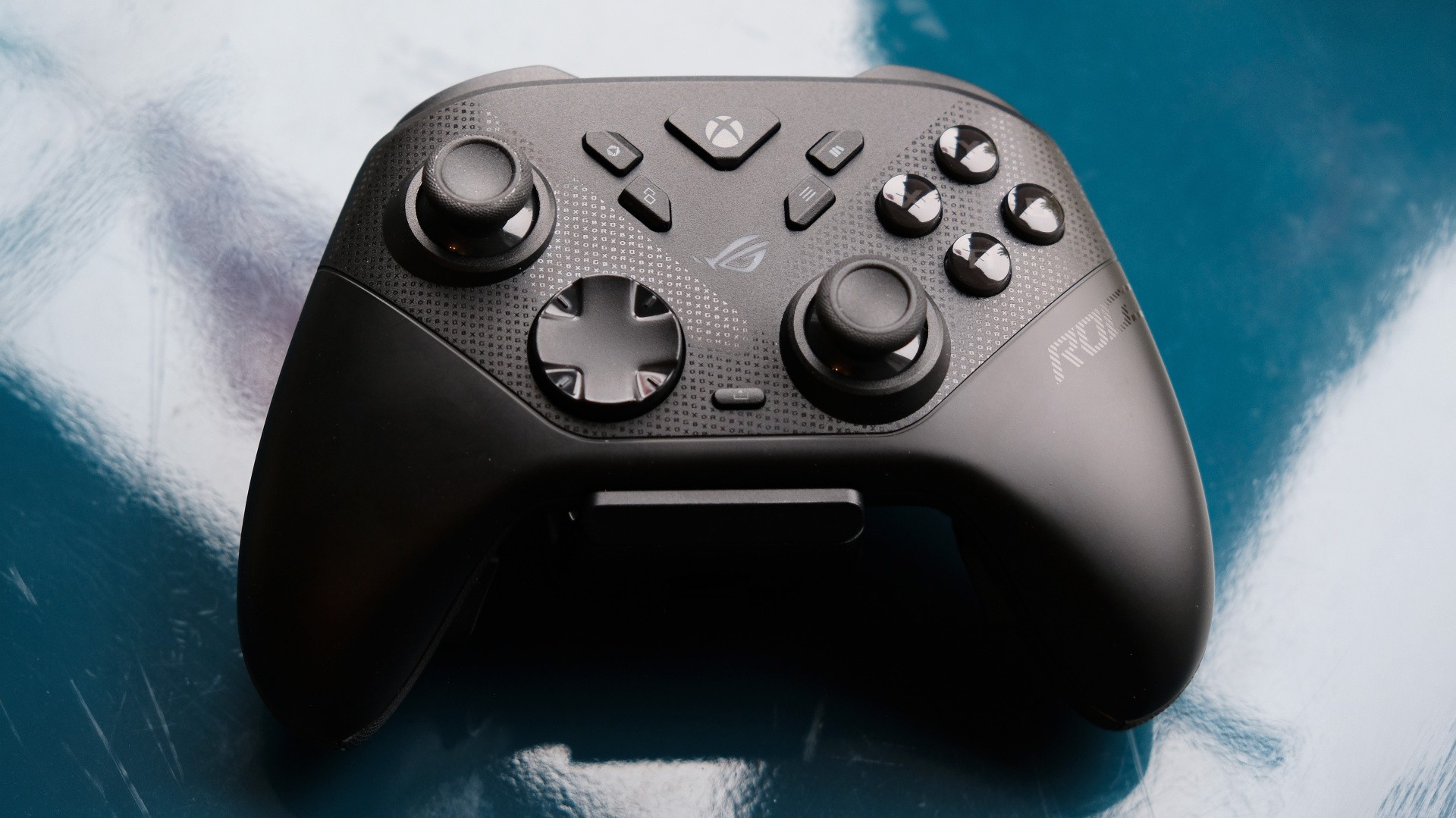
Microsoft's Elite Series 2 controller has been my pro controller of choice for quite some time, with that recommendation living on in both the Eurogamer and IGN best gamepad picks. However, the new Asus Raikiri 2 has now replaced the Elite for me, as it delivers essentially the same core feature-set while being better built, more capable and just plain more satisfying to use.
The core problem with the Elite is that it doesn't have the best reputation when it comes to reliability, with reports of stick drift, misbehaving buttons and even grip degradation. The Raikiri 2 looks immediately better equipped, with more durable microswitches used throughout, joysticks that don't drift and subtly textured plastic grips. I've only tested the Raikiri 2 gamepad for the past three months, but so far it's holding up well.
What I have been able to test out more extensively is the hardware and software on offer, and I've got to say that I'm a huge fan of the responsive feeling the gamepad provides. I'm spoiled by an early conversion to mechanical keyboards on PC, so getting a similar level of clicky and tactile feedback from gamepads with microswitches under the d-pad, face and shoulder buttons suits me down to the ground. Combine that with the precision provided by the tunnel magnetoresistance (TMR) sensors in the joysticks and (two-stage) triggers, and the Raikiri 2 feels extremely responsive.
Do you use a third-party controller on Xbox or PC? (180 votes)
- Yes, I use an Asus controller
- Yes, I use a controller from another third-party
- No, I use a Microsoft controller
TMR sensors are also more power-efficient than earlier Hall Effect (HE) alternatives, which helps the gamepad last a bit longer. The Raikiri 2 is rated for up to 50 hours, slightly up on the HE-equipped Raikiri Pro's 48 hours, even though the new controller uses a higher 1000Hz polling rate on PC. However, using vibration, RGB and the audio connection will all sap battery life, so expect more like 30 hours with all of the bells and whistles enabled.
Like the Elite Series 2, you get a full kit for £200 of your Earth pounds, which includes the controller, a wireless dongle, a screwdriver for the removable rear buttons, two button caps, a charging dock and a carry case that fits everything within. The charging dock in particular is great, as it ensures the pad is fully topped up whenever you come to use it, and it contains a USB port for the 2.4GHz dongle to reduce clutter.
Those rear buttons are handy too, as they're well-situated towards the periphery of the pad where your lower fingers are likely to rest anyway - and they're not hairy enough to go off unexpectedly. There are some games where I never use rear buttons (Deep Rock Galactic: Survivor) and others where they're practically required (Call of Duty: Black Ops 7), so it's nice to have the option.
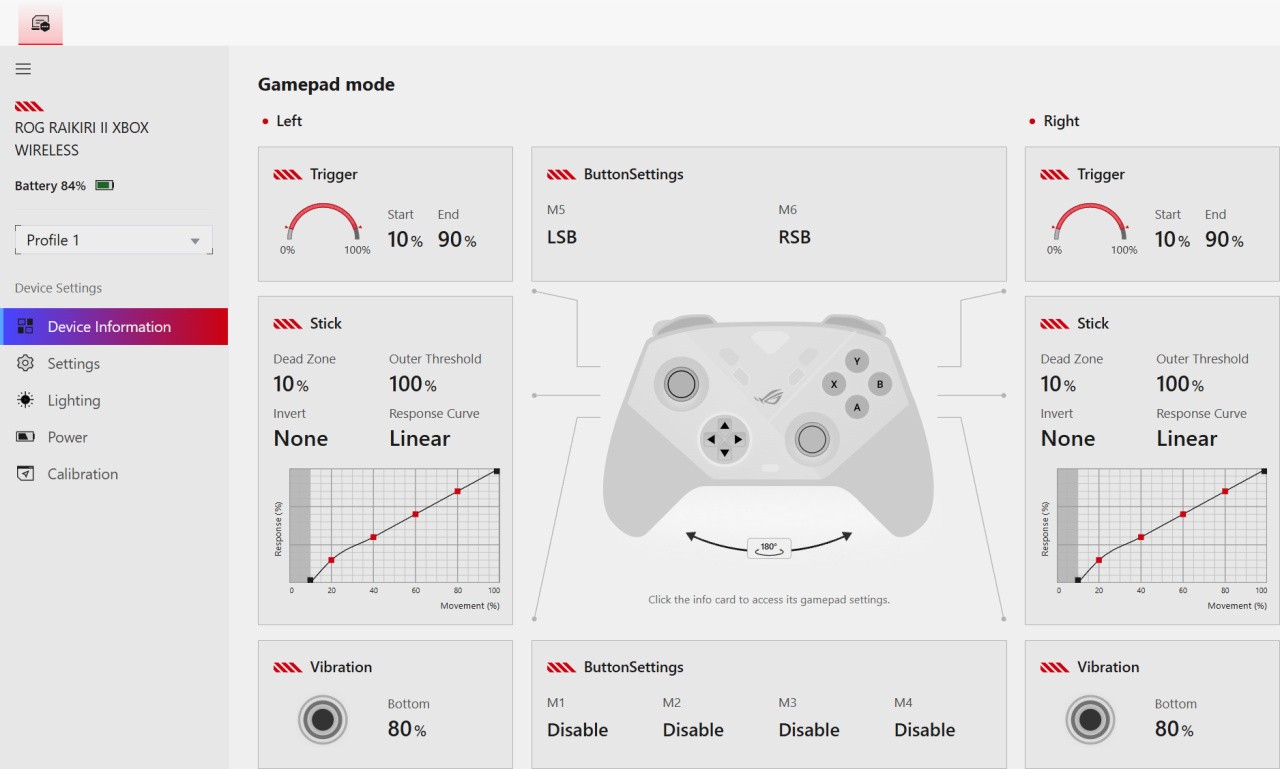
Configuring these buttons is, thankfully, something you can do in Asus' web app, so you don't need to keep software running in the background, clogging up your computer's resources. It doesn't look like there's a way to make settings on Xbox though, compared to the Raikiri Pro which had an OLED screen to make changes on the device - so a small downgrade for Xbox-only players there. You can at least set up your profiles on PC, then swap through them on the controller by holding down the pairing button, then pressing Y.
The Raikiri 2 was developed alongside the ROG Xbox Ally X, so it's not too surprising that the controller adds on the same extra buttons (and fine Xbox texture) as the PC handheld. The two additional keys are useful, accessing by default the Xbox game library and Xbox command center. That is handy for swapping between games and quickly making settings changes, but it does mean that the Start and Select keys are right next to buttons that will throw you out of the game. That's not ideal for slower-paced singleplayer fare like Final Fantasy Tactics, where you hammer the Start button a lot in the menus, but it's even worse for Call of Duty as it can leave you vulnerable. I understand the appeal of mirroring the layouts between the Raikiri 2 and the Xbox Ally, but these changes are harder to accept on a controller that may never be used with an Asus handheld.
Otherwise, there's little to complain about here beyond the price. The Raikiri 2 is a low-volume premium controller made with the latest tech, and it's only the presence of significantly cheaper options from the likes of GameSir, 8BitDo and HyperX that really call its value into question. I'd still recommend this high-end option over the Elite Series 2, which remains similarly expensive, but those on more constrained budgets will find plenty of great cheaper options that draw level in terms of features and only lose out in terms of polish and build quality.


Comments 11
Another incomplete review.
3 pictures of the controller, all top view with one upside down for some reason. Where are the shots of the triggers or rear buttons. A shot of the case and accessories?
Is William Judd paid by the article as most seem to be from him.
The problem with these types of controllers is the cost, I am fairly happy to spend money where it offers a benefit even if that might be somewhat marginal (5090 and PS5 Pro for example) but I cannot see the utility of these controllers even having used them. By far the best controller I have used is the Switch 2 Pro controller, the ergonomics, feel, buttons etc. are brilliant, far better than an Xbox Elite controller which I like less than the Dualsense which is my favourite after the S2 Pro controller.
@MattGPT
No way is worth a hundred notes more than G7 Pro and it doesn't even have Gyro controls which is a must for all things Nintendo emulation
Just the usual ASUS tax for the gullible E-Peen brand whores.
@Vyns Thanks for your kind comment! I've added a shot of the case and rear buttons, just for you
I love the removable rear paddles on the Elite 2 but the durability is poor. Expedition 33 did in my right bumper (parry it!). Fortunately, I’m handy with a soldering iron. I also find the triggers start to hurt my fingers when set to short throw mode. This isn’t an issue with my current go to, the Flydigi Vader 4 Pro. It offers gyro aim, tactical buttons, and rear buttons (the 5 model has removable paddles similar to the Elite 2 but durability for this mechanism is reported as poor).
Lol, Will....great to have you back.
3rd party PC controllers are a godsend. much cheaper than elite controllers for the most part. have a Flydigi Vader 4 Pro myself and it works great, was less than $50.
This will definitely be my next controller for my PC.
I have always used Xbox controllers with my PC as they are pretty much the standard in my experience so it makes sense to stick with them. I even bought an Elite controller for the paddles as I hate clicking down on the analogue sticks; it just feels so unnatural in my opinion.
However, Microsoft's quality control on their more 'premium' controllers is shocking. I've been through three Elite controllers (the original plus two V2 ones) and all of them have developed faults after less than six months of very careful use. I am the only user, I don't play games that require me to hammer the buttons (I always switch that to Hold anyway), I am the only user and I have never dropped them.
The bumper buttons broke on the original, the first V2 controller had stick drift after just two months - it was barely used being included as part of an Xbox Series X bundle - and the third had a LB bumper button that kept sticking and didn't always work properly. I am currently using a (white) Xbox Core controller, recycling the accessories and cases from the V2 Elites and so far that has been working fine and I've owned it 18 months.
That will be my last controller from Microsoft though as I have been burnt too often with their poor quality control. Will definitely be looking at buying a third-party option with higher-quality switches and much better build quality, etc, when the Core controller inevitably breaks...
@wsjudd Sorry Will, I'd had a bad day with hospital apps and I think I took some of the frustration out on you. Again Sorry.
@Vyns No worries mate, hope you're doing a bit better now. I don't know what you're going through, but I've spent more time in hospital over the past few years than I'd want to, and I know it certainly isn't easy in any case. Thanks for the follow-up, it's very decent of you, and honestly it was totally reasonable criticism.
I've just bought this controller from Amazon when I saw it for £185 earlier this week. It was just delivered today although I am currently at work.
Can this controller be used wirelessly with the Xbox Elite wireless dongle or does it only work with the one it ships with as it looks much smaller than the Xbox Elite one?
Show Comments
Leave A Comment
Hold on there, you need to login to post a comment...