
 by
by 
Microsoft's latest major update to Windows, version 26H2, has been let loose on the Release Preview Channel ahead of its public release later this year. The theme is very much in keeping with the Windows K2 initiative we reported on earlier this year, and forms part of a structural overhaul that focuses on speed, simplicity and customisability.
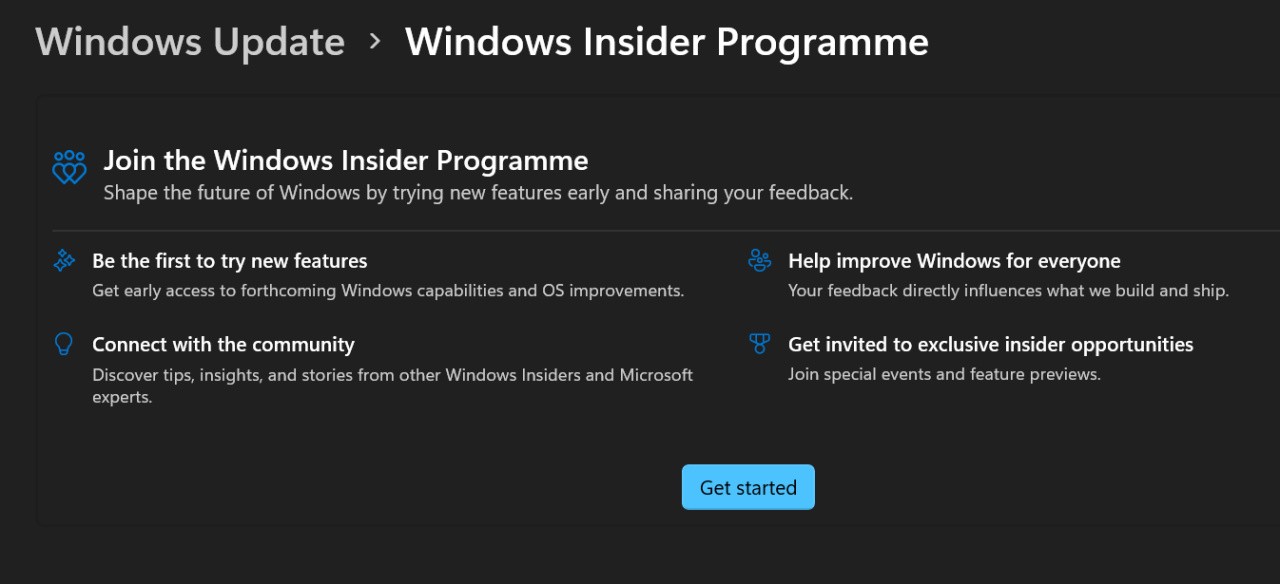
This means it's now very easy to try some of its new features by signing up for the Windows Insider Program - see screenshot below - so I thought it would be interesting to tell you what those features actually are. Here are the top seven inclusions.
1. Taskbar customisation: As far back as I can remember, it was possible to place the Windows taskbar on the top, bottom, left or right side of your monitor. That flexibility went away with Windows 11, but now it's finally returning - starting with a top placement option. There are also sizing options that allow you to grow or shrink the taskbar if you don't like the default thickness.
2. Local-only search: Yup, another popular registry hack is becoming an official feature. If you liked the extremely rapid search in earlier Windows versions, thanks to the OS only looking at your local (cached) file system, you can now make that the default Windows 11 experience. That means you no longer will see web results in search, but given that most people use their web browser of choice for this, that feels like a fair trade-off.
3. Ask Copilot integration: Another segment of people ask AIs to answer their questions, and this feature is intended for them. When enabled in taskbar settings, you will be able to ask Microsoft's Copilot to access settings, find files and launch applications. Thankfully, this is an optional feature for those that aren't interested in using Copilot.
4. Start menu redesign: This isn't a huge one, but the start menu is gaining more customisation options too. You're now able to hide your name and profile photo - which isn't really necessary to show on a single-user PC - and/or activate a more streamlined layout that just includes the bare essentials.
5. Low latency profile: A new performance-enhancing feature ramps up processor performance when opening an app or the start menu, thereby speeding up load times and overall responsiveness.
6. Pause Windows Updates for longer: This may not be of interest if you want to remain on the cutting edge by downloading a release preview, but it is now possible to pause updates for up to 35 days, and extend it as often as required. Update is also getting smarter behind the scenes, bundling updates together to minimise the number of times per month that you'll need to restart your computer to install them.
7. Modern run: The run window is finally getting a new lick of paint, with a contemporary appearance, a larger input field and the ability to show matching apps and their icons as you type. There's also a dark mode.
For more information on how to access the new features/version, you can check out the 26H2 Preview Channel blog post. Are there any features I missed? Or anything remaining on your wishlist? Let me know in the comments below.
[source blogs.windows.com]


Comments 10
while gaining one (1) additional position for the taskbar is nice, it'll take more than these to put Bliss back into my Windows user experience
I doubt that new Search function is going to replace the "Everything" search tool, but I'll give it a try.
There was no dark mode for W11? Glad I never 'upgraded' then.
I've already done a few of these with registry hacks, but I suppose it will be nice to have "official" methods.
My experience with Windows 11 overall has been so poor, my current PC will be my last with a Microsoft OS.
Why wouldn't 5 be default?!
Any chance on 6GHz hotspots? They released it in late '24 and then pulled it back. All kinds of mod hacks that worked for a second then got pulled and/or blocked.
@ghuribun No, it's just dark mode for the run window. Dark mode has been in W11 since the beginning.
I'll take all of those updates
@ghuribun there is and has been since I upgraded not too long after it came out (may have been there since launch but I didn't upgrade at launch so couldn't say for sure), I believe they meant for the new run window
@JJtheTexan I swear to God I must get lucky with Windows. I've never had an issue with Win 11 has done what I wanted it to do and I haven't had any crashed that were not caused by Nvidias crap drivers this last 18months or so. Same thing with Windows Vista and Windows 8 for me. I just never had issues with them.
Now I'm aware there were performance losses in gaming at first (for all of the OS I just listed now that I think about it lol) buuuuuuut unless I had an FPS monitor up I couldn't tell while playing.
I really do think the hardcore crowd, myself included not that long ago, put too much weight on benchmark graphs and too little on real world experience
None of that is to say your experience is somehow invalid (or that you are one of the types I was talking about) just my own little anecdotal experience and using it as a reason to chat with strangers on the net lol.
Show Comments
Leave A Comment
Hold on there, you need to login to post a comment...