
 by
by 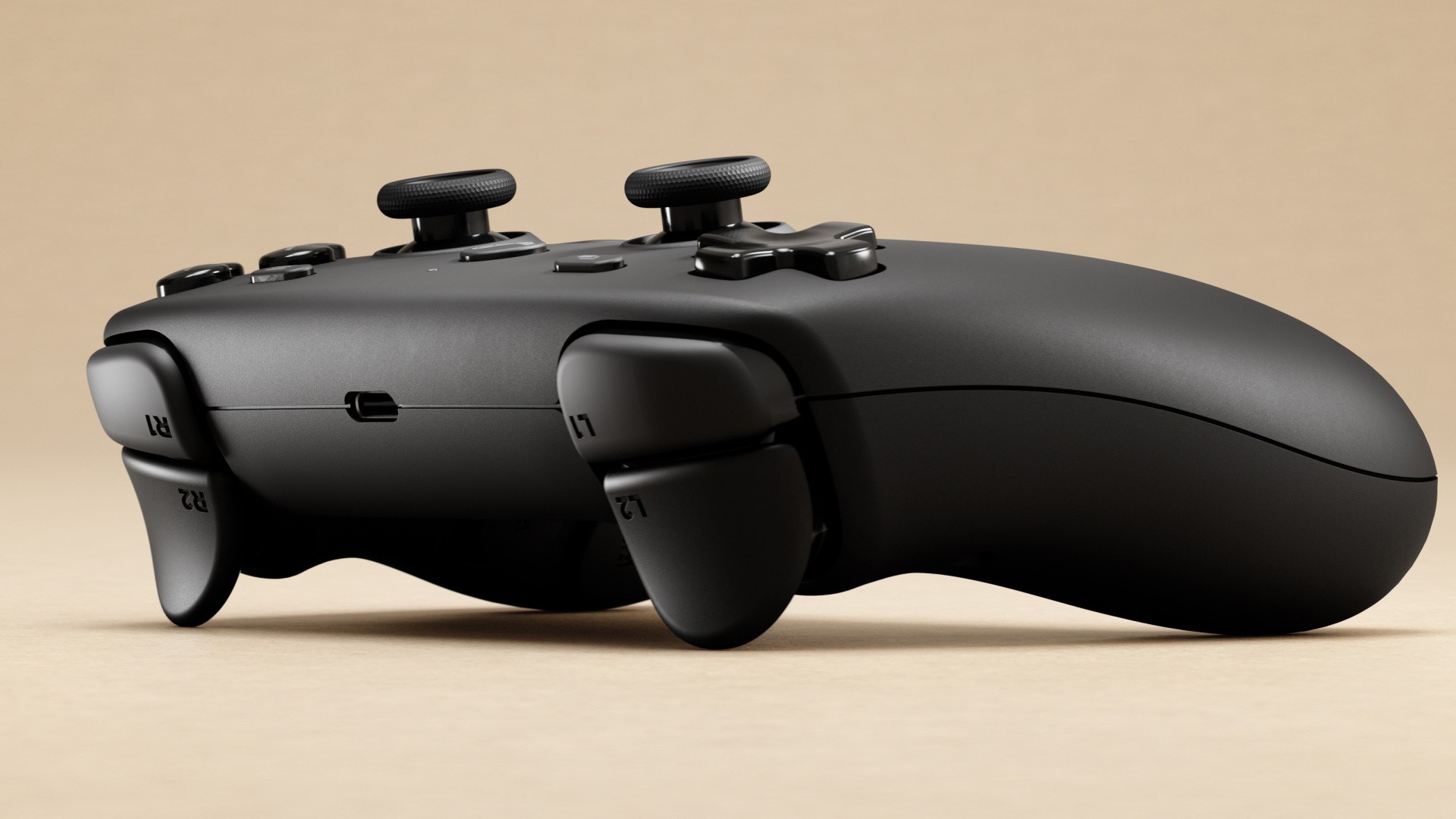
Ahead of the release of the Steam Controller first revealed in late 2025, we spoke to Valve developer Pierre-Loup Griffais and hardware engineer Jeff Mucha. Our conversation covers the long hardware and software design process, what Valve has learned in the four years since the Steam Deck, how the Steam Controller compares to the rest of the gamepad market and much more.
When you were designing the Steam Controller, was the brief to make a Steam Deck without the screen, or did it follow more from that original Steam Controller design?
Pierre-Loup: Definitely, I think the the main design exercise was actually when we designed the Steam Deck controls, because the mission statement was to make a controller that can be used like normal and feels familiar, but then has all of those extra inputs to be compatible with PC games - combining the original Steam Controller and a regular gamepad.
This time around, the design exercise of blending those two was already done, and it was more about translating it from a handheld PC to a traditional controller form factor, while retaining all of those attributes. We took some steps to improve the quality and the fidelity of various controls, as well as improving the ergonomics.
In terms of the whole ergonomic question, you've crammed so much into this controller with the twin sticks, dual track pads, face buttons, d-pad, four rear buttons, gyro haptics and capacitive sending. How was that as a design challenge, in terms of making sure the controller didn't feel too compromised and making sure the ergonomics were acceptable?
Pierre-Loup: That challenge again resembled the Steam Deck timeframe, because of the difficulty of fitting everything you mentioned where your thumbs and fingers can access them, while still feeling comfortable. For this form factor, we had a little bit more room to work with, compared to the Deck. So in a sense, it was a bit liberating design-wise.
Jeff Mucha: Yeah. We landed on a floor plan that was comfortable, so people who are familiar with Steam Deck could transition to this and not feel like you have to relearn a new paradigm.
Pierre-Loup: We had a little bit of extra space in the handles, so we were able to put in higher-fidelity rumble.
In terms of the stick layout, it's almost like something between a PlayStation and a Steam Deck. Is that the ideal reflection of where you'd like the sticks to be, or is the positioning based on the needs of the trackpad?
Pierre-Loup: I think it's a little bit of both. But definitely the stick positioning is mostly a reflection of the grip architecture and how you handle the controller. Once we had comfortable handles and enough real estate to fit everything, we wanted the sticks to be in the default position where your thumbs end up, because we considered them to be the primary input. We looked at average hand positioning from all of the testing we did both externally and at Valve, plus theoretical studies. We found that that spot where the sticks landed was kind of the sweet spot where most people were resting their thumbs right, so it was a good spot for the primary input.
Did you consider like an Xbox-style asymmetrical layout at all?
Pierre-Loup: We did, although it was more of a consideration for the Steam Deck, where we looked at any combination of staggering or inverting as you might expect. This time, aligning with the Steam Deck was a priority. We found that with the sticks being taller than the other two input groups, it made sense for them to be in the middle, so that you could fall onto the buttons or the track pads without having to stretch your thumb as much.
It was comforting to know that there was symmetrical stick layouts in the wild. Staggered sticks versus symmetrical is very divisive thing; everyone has their preference, Xbox versus PlayStation. When we found that it was the best layout for us, the fact that the PlayStation controller existed and so many players are clearly fine with it was a nice bit of validation.
It's been four years since the introduction of the Steam Deck. Has any of the data that you've gotten in the intervening time changed your ideas about controller design?
Pierre-Loup: By large, the Steam Deck feedback was positive and validating. I think the feedback we've heard the most on Deck was that folks looked at it and thought maybe it was a little bit big for them or it wouldn't be comfortable, but then as soon as they were able to handle it and spend some time playing it, the feedback was very positive.
For the Steam Controller, you're handling it a bit differently - you're able to relax your shoulders a little bit, they're less engaged because your hands are closer together. We took that into account by rotating the track pads and changing how the control groups are laid on the surface, so we think it's a little bit more comfortable. But I think Steam Deck showed us that it was a good layout, and people have had good experiences with it from what we can see.
What small changes did you make compared to the original Steam Controller?
Pierre-Loup: For the original Steam Controller, we got some feedback that the bumper buttons were a little hard and the noise was little high, so we tried to dial that back a little bit and go for a more rubbery, membrane feel because that's more in line with what people expect.
The rear buttons are an interesting one, because one of our takeaways for the Steam Deck and the new Controller was that we wanted all of the classic controller inputs to be where you would expect on a standard controller without needing to think about it. If the rear buttons were prominent or in the way, they'd actually interfere with that, and make people change their grip. So we disabled the buttons by default and made them less prominent and clicky, so you can use it just like an Xbox or PlayStation controller.
Why did you opt for TMR sticks over HE sticks or traditional potentiometer-based sticks?
Jeff Mucha: One of the issues with conventional carbon wiper based potentiometers is that they have a wear mechanism. We've heard about stick drift in the industry and we've experienced it ourselves, so by moving to a magnetic thumb stick, we're removing that wear mechanism, and we can maintain longer lifecycles, and have less drift and better reliability across the board.
The thing about TMR is that it's lower power than Hall Effect sensors, which is great in terms of keeping our power budget in line and not paying an extra penalty for that sensing technology. We've been looking at it for a long time, but it just got mature enough. With this product, we were able to implement it in a way that we're happy with and we think customers will really like it.
Pierre-Loup: Yeah, I really enjoy the feel of the TMR sticks personally.
How much of the layout is oriented around playing PC software that doesn't work well with controllers? It's not really a new question, but it does seem like a lot of the decision-making around this controller were oriented around making it work with the PC in particular.
Pierre-Loup: Yeah, the mission statement was make something that can be used like a normal controller without a learning curve, but can also play these mouse and keyboard games. If you look at the original Steam Controller and what it was designed to do, it was play PC games first and foremost, but when you were playing controller games it had a bit of a learning curve. So we wanted to make this aspect to be more seamless, where you could approach it as a controller by default.
We also really believed these additional inputs were so powerful, in terms of getting you to the rest of the catalogue, controlling your desktop and launchers and things like that. There's so much power there that we tried hard to make sure that these controls weren't relegated to a position where you had to change your grip to reach the trackpads. We really wanted the handle architecture to accommodate both.
So the fact that you're able to get to both of these worlds without having to reposition your hands or do a lot of work, is also a trade off. It means that visually the Steam Deck and Steam Controller look a little bit bulkier or harder to approach. right, But in practice, we think that we got to a really good outcome where you can get to both of these aspects in in a very comfortable form factor.
For Windows in particular, do you consider having a trackpad essential for navigating the OS and launchers and so on? If other companies are planning to make devices like the Steam Machine, is that kind of controller a requirement?
Pierre-Loup: We've thought about PC games in the living room for a long time - that was the mission statement behind the original Steam Controller, SteamOS and Steam Machine. And even on regular Windows PCs, we've seen the friction that is created when your gamepad can do 99 percent of what you want to do, but you need to use a regular keyboard and mouse to get through a launcher, or log into a lock screen. In most of our playtests, a nontrivial amount of people just give up at that point. So it was really important to us that you had the right inputs to unblock yourself in such a situation.
We also developed a bunch of software technologies to let you do that with other controllers as well, like Steam Input, which is a set of software and configuration layers that lets you get through all that stuff with an Xbox or PlayStation controller. You can, for example, hold a button and get a mouse control with a stick, but even then it's nowhere near as seamless as doing it with a track pad that's tuned for mouse control, for camera control, for these kinds of one-to-one mouse control navigation scenarios.
We're really happy to be able to say that this controller lets you do that. If you have a normal Windows PC, you don't have to change your OS, you don't have to have a totally different experience, and you can still get a view of what it's like to play your PC in your living room. And we expect that's going to be how a bunch of people use it.
One aspect of this controller that isn't present on the original Steam Deck is this whole Grip Sense capacitive touch functionality. Can you speak about how that came about and what kind of problems that was designed to solve?
Pierre-Loup: That input specifically is in line with another innovation that we had with Steam Deck, which had capacitive touch sticks. We expect Grip Sense to be used in the same way, which is to toggle gyro aiming on and off. You don't have to get your thumb on the stick to enable the gyro now, you can toggle it with your grip at whatever actuation point feels comfortable. And you can set haptic feedback if you want. We think there's a bunch of people out there that are using gyro in all sorts of ways and having more ways to toggle it - in a way that is not tied to any of the physical controls on the Deck and the Steam Controller - gives them more flexibility. That being said, trackpad touch and analogue stick touch is a great way to toggle gyro input as well.
In terms of the haptics, like improved precision in the haptic motors, are developers able to target those directly, or do games with standard Xbox rumble get translated into the controller's haptic motors, and you get a better experience?
Pierre-Loup: There's a few layers there for sure. Right now, the most common way that games interact with it is through normal rumble. But the rumble motors in the Steam Controller can give deeper rumble than those in the Steam Deck, and the haptic motors under the trackpads can give a tactile tick. This can be accessed through the Steam Input API, so you can program your own trackpad gestures that give you different tactile feedback. We're interested in improving those APIs so you can have higher-fidelity ways to communicate with the haptics, like waveforms and things like that, but we don't have specific plans - it's something we want to pursue in general.
The Steam Controller works well for playing Steam games, but what about for people that have games from Xbox Game Pass or Epic? How much functionality should they expect with this controller without first adding the game to Steam?
Pierre-Loup: The answer varies slightly by operating system. On SteamOS and Linux, you can use a baseline driver outside of Steam. On Windows, you need Steam to do the gamepad API translation, but the Steam overlay will work on almost anything - OpenGL, Vulkan, DirectX, anything that is a graphical app, you can add to Steam.
If you have a game that doesn't work, you can do a mouse-and-keyboard configuration, though you lose out on gamepad compatibility in general. I think some older Xbox Game Pass games are UWP, and that's not supported at all, and we're interested in working on those on a case-by-case basis. If there are major third-party games that don't support the hooks, we want to work with them and get it figured out.
Would you consider operating as a standard Windows XInput style controller for those edge cases?
Pierre-Loup: The thing with those standard APIs is that they're tied to a certain controller type. If your controller is exposed through the native Xbox API, through XInput, your controller is essentially an Xbox controller - and that means you wouldn't have all these inputs and be able to express this stuff.
In theory that could be done, if we made the Steam Controller a licensed Xbox or PlayStation controller on top of everything else, but then you'd have to have a big mode switch button where the user would have to figure out what mode they were in. That requires extra circuitry in the controller, and just an extra cost we'd have to burden the user with. It wasn't clear whether this extra feature could work well together without compromising the existing feature set or the cost of the controller.
Where do you see this controller within the existing controller ecosystem, from generic USB controllers to first-party console controllers and more premium options?
Pierre-Loup: If someone's playing games where their normal controller is working well, that's great - we want to encourage that; we're not trying to prescribe a certain controller or a certain way to play. We've been working on Steam Input support with Sony, for example, to make sure PlayStation controllers are supported on PC. I guess I see Steam Controller as less of an upgrade from a normal controller, and more something that opens up new possibilities. We also have people playing on Steam Deck that might benefit from familiar inputs when docked.
Is there anything in particular that you're very proud of that hasn't been mentioned so far?
Pierre-Loup: We're really proud of the puck and its ability to connect four controllers without losing any latency compared to Bluetooth or other transports - we think that's very useful. Being able to have up to four controllers per Puck - 16 controllers per PC if you have four Pucks! - is something we're really happy with. We wanted to make sure that the input latency was the same no matter how many controllers you have connected, which is not the case with other other transports.
For the core controller functionality, one thing we're really proud of is the ability of the trackpad and trackpad and gyro together to really hold their own against mouse input. We've done a lot of work on bringing trackpads from something that's serviceable to something that you can play a first-person or third-person camera game with it and have a good experience. The way that we've tuned our trackpad for gaming, with the haptic feedback, actually lets you build muscle memory, and it's really similar to handling a mouse in a way. And once you have the trackpad set to high sensitivity and the gyro set to low sensitivity, it's akin to when you're using a mouse, using your arm for big movements and your wrist for fine movement. If you get a bit of practice, we think that trackpad gyro is actually a very good analogue to mouse controls. Playing Counter-Strike and actually being closer to the performance of a mouse than the performance of a controller, we think is a really exciting thing.
On the flip side of that, being able to play games like complex 4X games or games like Factorio with lots of hotkeys, being able to set radial menus and touch menus on the left trackpad with 16 hotkeys that can be changed. That's something you can do with Steam Input on other controllers, but the hardware features of the Steam Controller make it go to the next level, and you can play these games and actually get a good outcome from it.