
 by
by 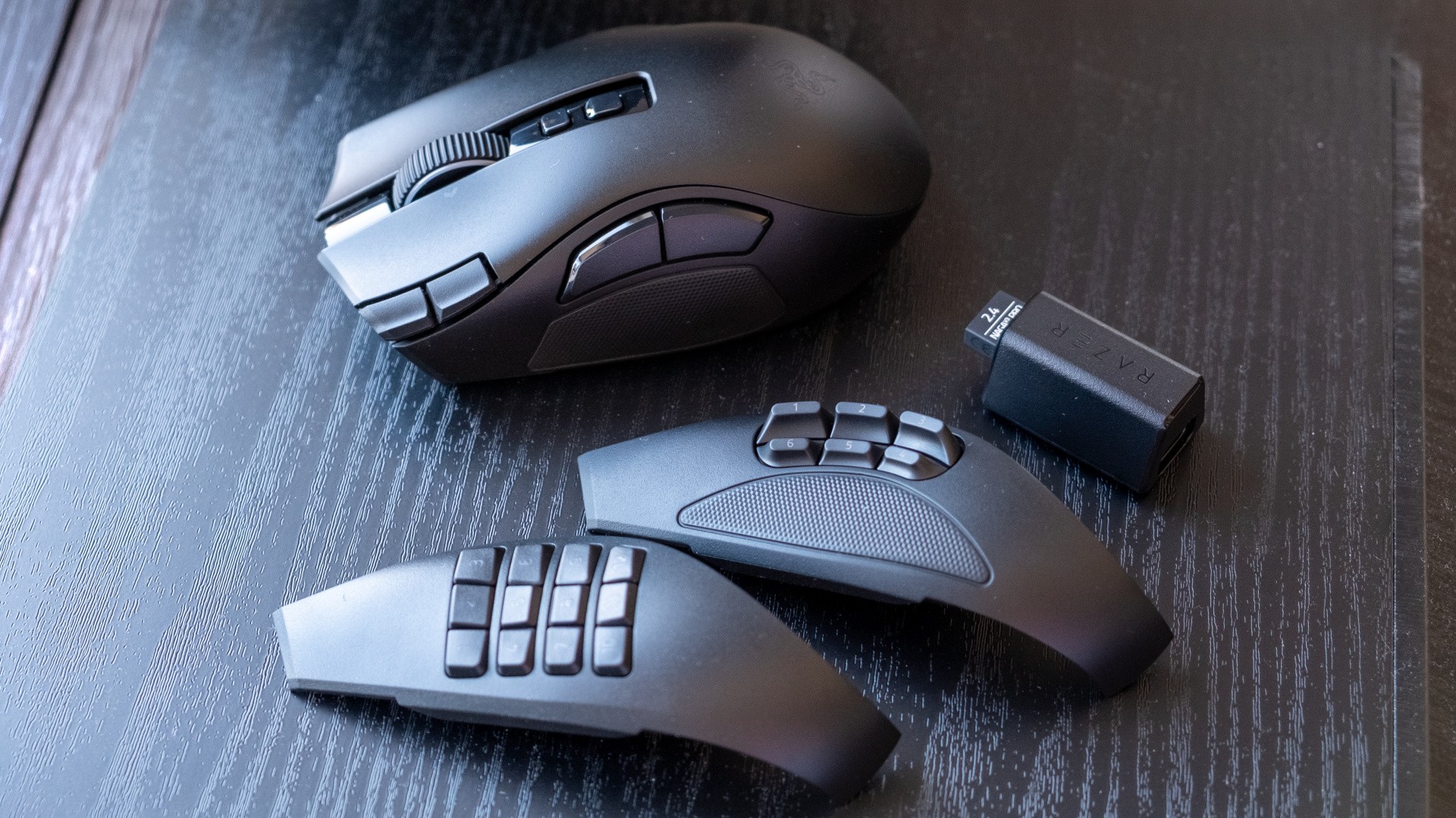
Want a mouse with more buttons than some keyboards? One that can transform into a slightly more normal mouse too? Well, Razer has just the thing for you with the Naga V3 Pro, the latest in their line of MMO, simulation and macro-oriented gaming mice.
The Naga V3 Pro has up to 23 programmable buttons, including up to 12 on the side, two near the left mouse button, one lockable ring finger button, two below the scroll wheel, three built into the scroll wheel, one on the underside and then the normal left and right clicks. If that's way too many buttons for your needs, then you can instead swap in a replacement side plate that has a more manageable six or two buttons instead. It also has the scroll wheel of the Razer Basilisk, which can swap between normal clicky steps, even finer clicky steps and a free-rolling infinite scroll mode - or a hybrid that automatically engages the free-spinning mode when you scroll a lot.
As well as having this inordinate quantity of controls, the Naga V3 Pro is equipped with a lot of the same high-end features as more traditionally-shaped Razer flagships, like the DeathAdder V4 Pro and Viper V4 Pro. That means up to optical mouse switches, up to 8000Hz polling (with dongle, sold separately), a high-end optical sensor with up to 50K DPI and a more lightweight construction (it's 117g, down from 134g on the last-gen model). That means, weight and shape aside, the mouse should be fundamentally just as capable.
Battery life doesn't leap as much as I was expecting given the new internals though, moving from 150 hours on the V2 Pro to 155 hours with the V3 Pro. The Viper V4 Pro doubled the battery life of its predecessor, so I suspect that battery capacity might have dropped slightly with the new Naga model in aid of that lower weight. The mouse is compatible with Razer's Hyperflux mouse pad charging solution too if you want to go that route.
Given how much is going on with this mouse, the Naga V3 Pro's design is honestly quite approachable. Sure, the side plate with a telephone grid of 12 buttons looks a bit full-on, but swap on the six-button or two-button variants and you have a wide but relatively normal looking member of the family Muridae. The extended ergonomic shape of the right-hand side gives welcome purchase to your ring and little fingers, and naturally suits a palm or claw grip. The coating is a little grippier than its predecessors too.
There's still a sense of weight here, despite the 17g generational reduction, and the mouse feels well-built. The same can be said of the plate-swapping mechanism, with plates dropping into place with a satisfying click and clinging on gamely even through high-speed manoeuvres.
Given the number of keys here, the software solution is quite important - as you'll either have one really big session setting up all of your keybinds and macros, or you'll regularly add and change them to suit what you're doing. Thankfully, Synapse is genuinely good these days, with a smart layout, excellent tooltips and reliable operation - though it does take up around 400MB of RAM, about the same as Discord or Slack for me. Razer representatives tell me that Synapse Web support is coming post-launch, which will be a better option for people that don't want to have Synapse running or even downloaded to their computer.
The upshot here is that you have a truly bonkers number of controls available, and setting them up is as painless as I can imagine. After adding the six-button side plate and saving my bindings to the mouse, I loaded up my current obsession - the 2018 BattleTech game with the BTA overhaul mod installed. BattleTech has a lot of slightly odd controls you might want to click frequently, like "-" to brace your mechs, "tab" to swap between them or "3" to set them to sprint mode instead of the default move, so being able to have these on the Naga V3 was genuinely useful. I found the lockable right button was ideal for tab, given me extremely rapid access to several lances worth of BattleMechs and vehicles, while the extra side buttons meant I could trigger any common or uncommon ability - as long as I could remember which button was which. Each button here actually has a slightly different shape, so it was easier than I expected to avoid random misclicks, though there's still a bit of time investment required to rewire your brain if you're not used to mice with this many buttons.
The usual downsides of high-button-count mice like the Naga is that performance necessarily suffers in games that reward faster-paced and more accurate mousing, typically achieved with a smaller and lighter design with a higher-end sensor. The Naga V3 Pro does better than its predecessors in this role, thanks to its lower weight and higher-end components, but while it is serviceable playing Counter-Strike or Valorant, I did have a few rounds where I wished I was using something else. It's just not easy to acclimate to a 100g+ mouse after years spent with mice that weigh half as much or less, and even when comfortable it's just a little unwieldy for quickly picking up and repositioning.
The silver lining here is that the wider, more relaxed shape is just fine for regular computer use, and if you're a streamer or content creator that relies on macros to speed up your everyday tasks, then you have a surfeit of controls at your disposal to trigger these. With the Naga, there's little real need for a Stream Deck, for example - though admittedly, the Stream Deck's button displays obviate the need for remembering where every macro lives. The scroll wheel was also particularly useful for skimming through long documents in its infinite scroll mode, and the ability to activate this automatically with a big scroll soon became second nature.
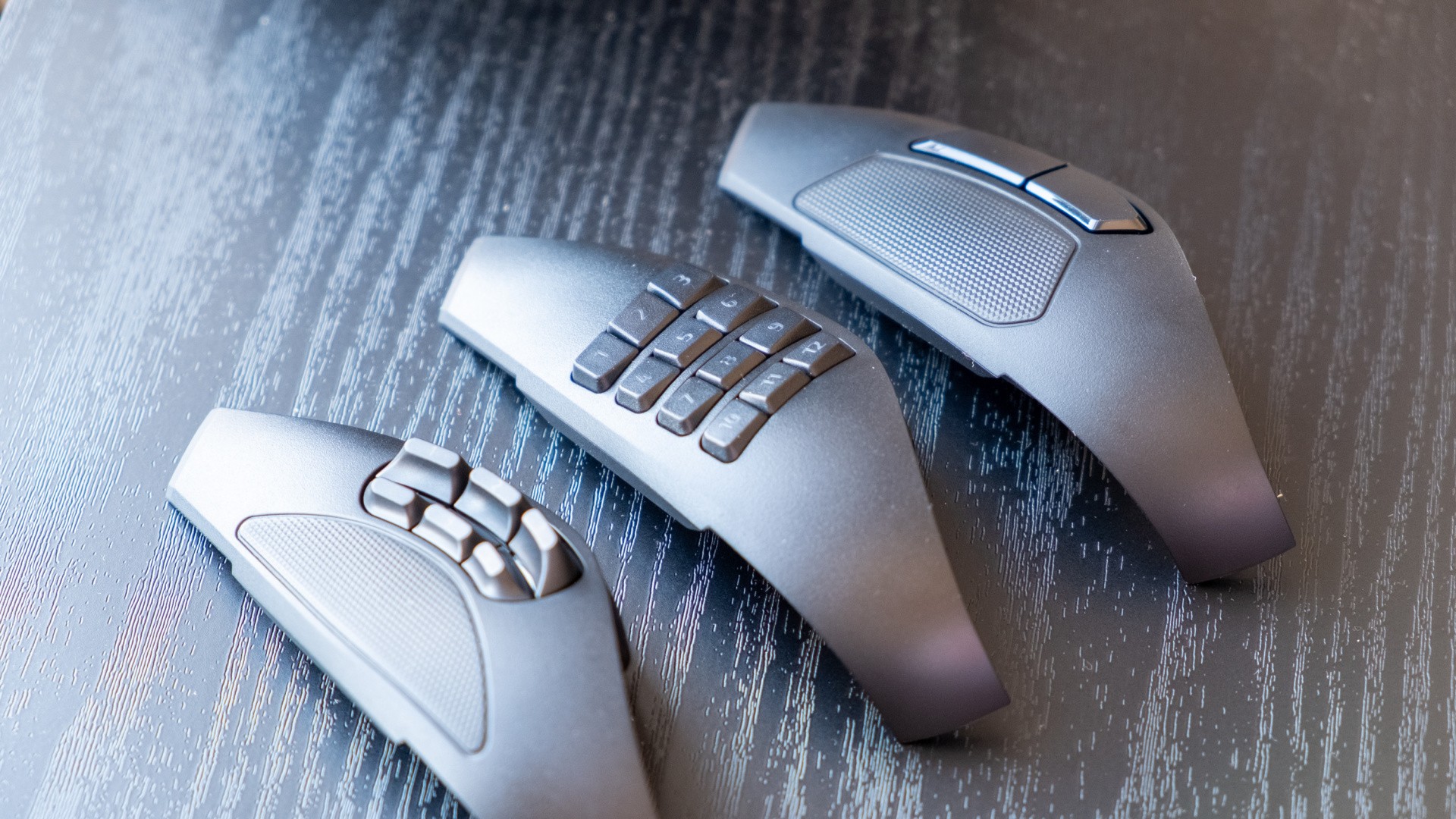
Coming to the end of just under a week with the Naga V3 Pro, I found myself liking the mouse more than I expected. It's quite different to the lightweight symmetric mice I normally use, but the wider shape, smart scroll wheel and huge amount of extra buttons make a strong case for MMO mice as a whole - I can see why some people absolutely love them.
That said, I don't know if a mouse that has three swappable side buttons is necessarily worth the £180/$180 asking price - I mean, you could genuinely get three great wireless mice for that, especially if you look at Chinese brands like Mchose, Ninjutso or Akko. And if you need an MMO mouse specifically, the Razer Naga V2 Hyperspeed (£83) or Corsair Scimitar Elite Wireless SE (£108) are a lot easier to stomach price-wise, though you do lose out on having a single mouse with ability to adjust to a wide range of game genres.
Ultimately then, the Naga V3 Pro is by far the best high-button-count mouse I've ever tested, but it's only likely to be enjoyed by a select few. I hope it's followed up by a more mainstream version, as something with similar capabilities and slightly worse specs at the £100 mark could be an absolute game-changer.
Please note that some external links on this page are affiliate links, which means if you click them and make a purchase we may receive a small percentage of the sale. Please read our FTC Disclosure for more information.


Comments 1
I'm a big fan of the Naga and didn't realise there was a new one out. The extra buttons will be really useful. I use all 12 side buttons in GW2
Show Comments
Leave A Comment
Hold on there, you need to login to post a comment...