
 by
by There's more to DLSS 4.5 than we've previously talked about. We've already covered what Nvidia refers to as "Preset M" - a new, transformer-based algorithm for performance mode (effectively 2x2 upscaling), but two models were included in the package. "Preset L" is the most advanced DLSS model Nvidia has ever produced, looking to deliver excellent quality with a far more ambitious 3x3 upscale. With 4K resolution, for example, Preset L is upscaling from just a base 720p image. Drop down to 1440p and - remarkably - Preset L is reconstructing from just 480p. Results with Preset M were mixed, so how does Preset L stack up?
As usual for content about image reconstruction technologies, watching the video is the best way to go in getting an idea of how good the quality actually is, but here are a few bullet points to kick off with:
-
Similar to DLSS 4.5 Preset M, games don't native support it. You need to use the Nvidia app to override the pre-existing settings in DLSS-supported games.
-
This is the most computationally expensive DLSS yet. On an RTX 3070 at 4K resolution, upscaling from 1080p, Preset M is already 18 percent slower than the original transformer model (Preset K). Preset L is even heavier. It is 27 percent slower. The performance gaps will be lower on RTX 40-series and 50-series cards.
-
However, it's understandable why Nvidia recommends ultra performance mode for Preset L. It is faster than performance mode with either of the previous transformer models. So it's a question of whether the quality of ultra performance with Preset L is better than the other options in performance mode.
-
In terms of challenging trouble spots for DLSS 4.5 Preset M, we note the same issues with particle reconstruction and wire rendering on Preset L.
-
Aliasing and foliage fizzle we saw in Silent Hill 2 and Horizon Forbidden West are definitely impressed with Preset L over Preset M.
-
"Boiling" artefacts on ray tracing effects seen in Preset M also present with Preset L.
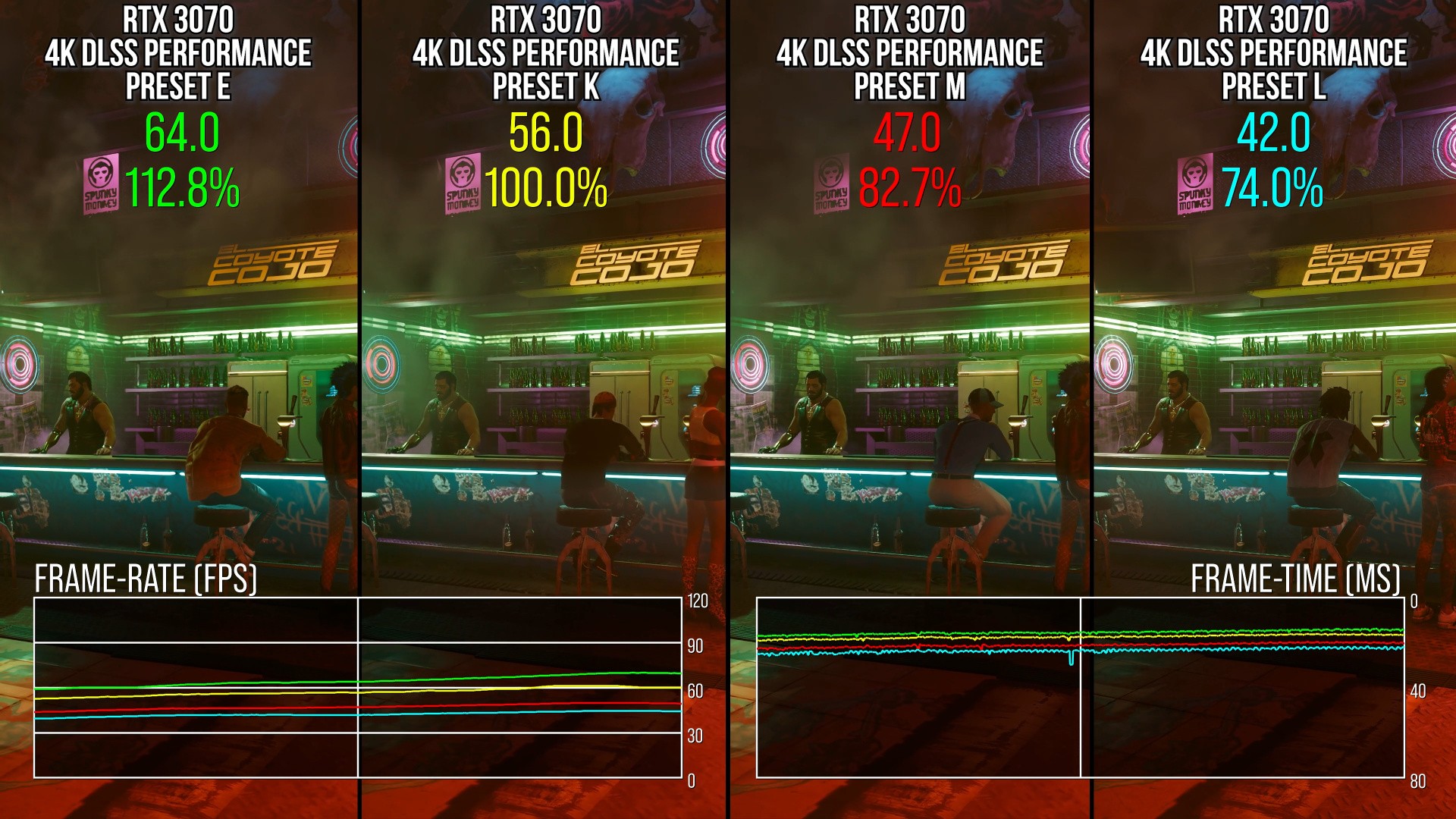
On the face of it then, in like-for-like testing upscaling 1080p to 4K, there are only modest improvements in addressing the issues we first noted with Preset M. The ray tracing situation in particular is probably the main element that should be addressed. However, there's an interesting wrinkle here. It seems that DLSS 4.5 in both presets does not interact particularly well with denoised RT effects - but a remarkable thing happens if you actually disable the games' denoisers. The problem disappears.
On the one hand, this means DLSS is a better denoiser than some games' standard denoisers - which is kind of funny - but on the other hand, it means DLSS preset M and L have issues when overlayed after stock denoising. That is problematic as we want image reconstruction to be as plug and play as possible without these issues and without having to effectively mod games, but also, we probably want titles to implement things like DLSS Ray Reconstruction anyway.
So far, we've been looking at like-for-like testing against prior DLSS versions with 2x2 upscaling at 4K - but remember, Nvidia's recommended use-case scenario is 3x3 upscaling instead via ultra performance mode. The image quality characteristics are much the same, however, with differences lying in the amount of detail resolved and how competent anti-aliasing is at any given moment.
-
Preset M at 4K performance mode is quite comparable to Preset L in ultra performance mode, despite the massive jump from 4x scaling to 9x scaling.
-
However, Preset L's inner surface detail can be flatter, with reduced normal mapped texture detail.
-
On a general level, Preset L is softer in ultra performance mode than it is in performance mode, so it looks softer. But this is a general trend across many games: the lower the DLSS preset and the more aggressive the scaling level, the softer the image gets.
-
Regardless, Preset L in ultra performance mode can look pretty great - the issues with RT effects is much more of a problem than any drawbacks in using a lower resolution.
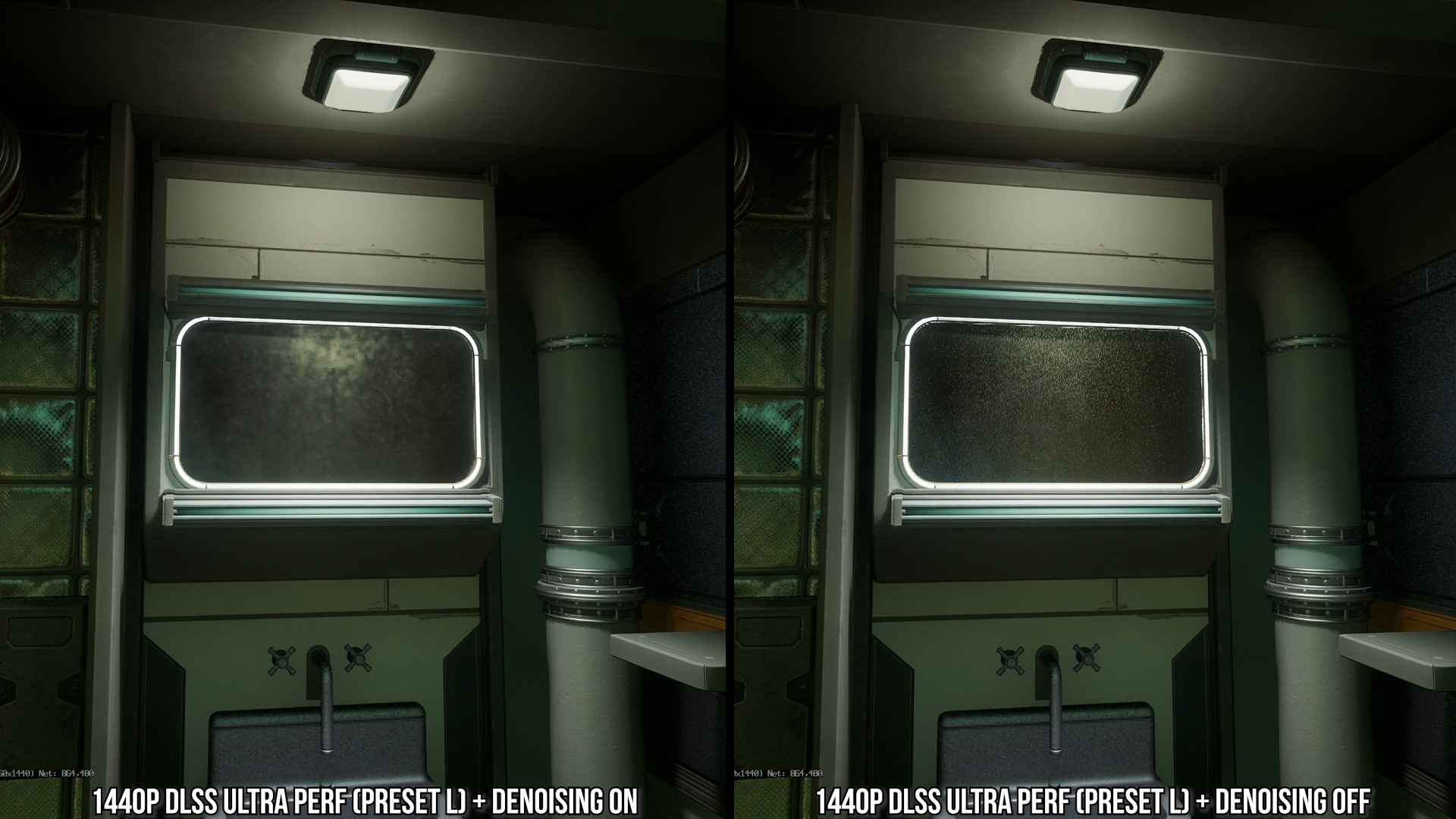
Potentially, Preset L could benefit users of older RTX GPUs if quality holds up in ultra performance mode at 1440p. It's a tough ask bearing in mind the core 480p (!) resolution. Of course, the RT issue is far more pronounced here, while sub-pixel detail is significantly compromised at lower resolutions giving DLSS far less to work with, resulting in ghosting artefacts.
However, perhaps the biggest issue with ultra performance mode at 1440p - even with Preset L's high quality upscaling - is that most games are just not designed around this scenario and have a surprising amount of oversights or compatibility issues. For example, Ratchet and Clank: Rift Apart's RT ambient occlusion completely breaks at this scaling level, while strange lines can follow the camera around in Remedy's Control. Forza Horizon 5 looks fine until water splashes onto your car, causing flashing speckles, while tessellated deforming surfaces cause some remarkable artefacts. Ideally, this would not happen if every aspect of the engine's parameters were set up to scale with output vs input resolution, but that cannot be expected across the board for all games.
Ultimately, Preset L has advantages over Preset M, but it shares the same issues with ray tracing noise, which - curiously - appears to be caused by some interaction with games' standard denoisers being on at the input resolution. DLSS 4.5 produces superior results when they are turned off. Preset L is nice for a 4K resolution output at ultra performance mode on modern RTX GPUs, but becomes less impressive at lower resolutions like 1440p. Still, there's nothing wrong in giving it a go yourself, but my recommendation would be to use an existing, cheaper model like Preset K or Preset M at a higher internal resolution.


Comments 10
Hrm. I'll have to try this out on my current admittedly oddball setup....
1. at 10ft sitting distance, I can't tell the difference between 1440p and 4k on my television. SO, I set my gaming laptop to outpt at 1440p... yay free performance!
2. I have a gaming laptop connected to that television at said 1440p. It's nice 12GB 5070ti laptop. Take of that what you will, it's great for the 1440 sweet spot, honestly.
If Preset L gives a little better quality, I don't think I'd mind the slight milliseconds hit if I run it at balanced mode in this above setup. I think it would be a good win and decent compromise between quality and performance.
Great review Rich! It's becoming a bit hard to decide which setting to use when. Maybe we need a flow chart
@NandoCalrissian Which is why Oliver doesn't like all the settings! It's just nice to just play games and not have to worry about which mode looks best.
@themightyant
When you'll have to start at 720p + FSR2 to reach 60fps: You won't be able to help but worry about this while playing.
The PC and console tests are increasingly separating, more or less like they did at the end of the previous generation's lifespan.
Maybe it's because it's better to analyze the consoles with a closer look, perhaps saying that with the above settings it's not bad, before looking for nitpicks in the best upscaler out there, and by far.
Oliver called Dragon Age Veilguard pretty good, starting at 504p. What are we talking about?
I wish I'd watched this before my Silent Hill 2 playthrough. Those clean reflections are lovely.
@MemuAccount Final perceived resolve matters more than base resolution and this varies game by game. It's also subjective. I frequently see DF say things are "unplayable" that I enjoyed playing.
@themightyant
In theory, your point makes sense...
In practice, so looking at the history of the value weighted by DF: It has the usual flaw, that is, the usual double standards depending on what and how you're looking.
Explain to me why Oliver had a big grin when talking about TLOU-2 on PS5-Pro with PSSR.
Remember:
"Hey, it looks native, hippy hippy yeah yeah! Incredible! Impressive!"
In the early days when only the Xbox Series S could handle 720p, there was a sarcastic smile followed by a comparison with the PS3.
There, it wasn't good enough; it was simply poor and confusing.
Now that standard consoles are running at 720p (but also 504p, as we said above), 720p isn't bad after all. From a reasonable distance from the TV (I don't know which one, and it's better not to say...) you can't see much, but ultimately it's good, and at times excellent.
The same concept can be "exported" to the 60fps, VRR, SSD loading, etc. Until they arrived on consoles, it wasn't very useful, and not having them wasn't a problem. After that, it was indispensable, and not having the plus—or any more—was a failure.
Forgive my frankness, but with such a distracted user base, they can easily make donkeys fly; maybe they'll even explain that they fly because of their big ears...
@MemuAccount I feel this is two separate issues.
1) Saying standard consoles are running at 720p and comparing that to Series S is disingenuous because, as I said, the base resolution isn't all that important anymore, it's the final perceived resolve that is more important. E.g. if with AI upscaling we can have a 1440p - 4K-like final image from a base of 720p - 1080p, but with added effects over what we would have at 1440p - 4K and higher/ smoother frame rates then that will usually be preferable as it's a better perceived final image.
Hence comparing Series S at 720p with comparatively weak FRS upscaling vs DLSS 4.5 from 720p is a complete mismatch. They don't remotely resolve the same, one is visibly far better. As John succinctly put it (I paraphrase): "it's the quality of the pixels not the quantity that often matters now".
2) Re: 60fps, VRR, SSD etc. I agree that these didn't seem important to many gamers until they had them in their hardware, and now it's hard to go back. But this is entirely normal social behaviour. Until a threshold is reached where an idea is adopted by a significant majority it isn't perceived as a standard or often even necessary. Consoles with their fixed specs, releasing every 7ish years and selling upwards of 50 million units are usually a place for these thresholds to be changed and new standards to be adopted by players.
@themightyant
We don't understand each other. I'll give you some more examples...
XSS has been heavily criticized, as if the threshold below the major consoles wasn't decent, now the Switch-2 still seems good. How many times have you seen XSS results benchmarked against price and/or theoretical power? Almost never, I tell you...
XSS was awful regardless. Don't tell me you really think the difference now could be the difference between TAAU and FSR-2, when it was awful in any way?
What is being considered in this test?
Do you see the criticism consistent with the sense of proportion you're talking about?
Shouldn't a company that claims to be a pioneer of technical tests always consider technical differences? That's what I was talking about, not the difference in mass perception, which is often influenced by the industry press.
If it were as you say, this test would be about hairs crossed, not problems. You can't see the double standards because you've been trained to think like that.
I was talking specifically about Oliver, who with the PS5 Pro, once said that from a distance you can't see the glowing red doll (shimmering on Astrobot), another time that you can't see the lack of sharpness.
Consistency is the essence, and the only consistency DF can afford is to amplify and/or minimize as needed, tending to have the mid-range consoles at the epicenter of the universe.
Why has there been more talk of ML upscaling with the PS5-Pro and SW2 than in the previous 7 years? Why are there no cross-tests with PC?
Why was FSR1 only a flop on the road on PC?
Does it seem natural to you to continue carrying the Ryzen 3600?
They test it more than anything else, just like in the PS3/X360 days, they forced PC resolution to 720p, and said the assets were the same even at 1080p (which isn't always true), 60fps wasn't essential, etc. Except for celebrating GOW-3 on PS4, where the assets seemed to be made to be better, and the mipmapping worked wonders—which was also a given on PC, but there wasn't even a mention of it there.
You mean to tell me that perception improves with age?
Old age is supposed to improve your eyesight...?
And then the PC alone has a market that rivals the rest of the world, yet there are a lot of PC-only tests that failed, like Mafia, Stellar Blade (how many articles for each patch and for the PS5-Pro version?), Wuchang, etc.
You've veered into the unsolicited. I was talking about DF, and Oliver specifically; you've changed the subject by bringing up the masses' perception of time.
You've been happy with the narrative they've cooked up for you; if you don't follow the same path, it will seem strange, and you're led to justify the real inconsistencies without needing any encouragement.
Do you think that when the new consoles come out, they won't make the differences in upscaling and starting resolution count? You're just wrong to assume so...
By the way, look at the "significant difference" in Hellblade 2 on PS5-Pro, for just a few extra pixels (with accompanying music by Ennio Morricone).
Oh I am so confused! Hahaha. Really not sure what model to be using???
I have a 5080 and mostly use DLSS upscaling. 4K monitor. I’ve been playing KCD2 at performance on epic settings, Arc Raiders at performance. I may occasionally use ‘balanced’ or even ‘quality’. What mode should I use??? Help! Hahahaha
Show Comments
Leave A Comment
Hold on there, you need to login to post a comment...