
 by
by Since its launch earlier this year, the PC version of Monster Hunter Wilds has proven absolutely agonizing to test on more mainstream systems with 8GB GPUs. Though we've repeatedly called out our findings on what appears to be wrong, our hopes for an official MHW fix to its cursed performance on low- and mid-spec PCs remain unfulfilled.
Of course, this is PC gaming, and where there's a will, there's often a fan-patch way. So we take our hats off to a clever-yet-simple solution that not only makes MHW much easier to recommend on PCs, it also could apply to a few other notable stuttering games.
As we've previously reported, Monster Hunter Wilds currently forces owners of 8GB VRAM GPUs into a lose-lose proposition: either dial down textures to a setting that makes them blurry and discoloured, or face the constant issues of intermittent stutter and texture pop-in. Is this just because your GPU is somehow unequipped to handle decent-looking textures?
Not exactly. We know that GPUs with 12GB of VRAM exhibit similar camera-turning stutter in MHW (only with enough brute force power to stabilize them in ways that are less perceptible), and we also know that reducing texture quality doesn't completely fix the issue, either. That led us to theorise that the issue stems from an overly aggressive DirectStorage decompression methodology - one that pounds the GPU into stuttering territory in spite of having enough VRAM to capably hold high-fidelity texture data, as otherwise reported by in-game stats.
This was merely a theory of ours in February, one that enterprising modders have since acted upon. Sure enough, the act of removing DirectStorage decompression from this game appears to fix this very issue. Although, let's be clear, it's not a magic wand for MHW performance across the board (ie it won't make ray tracing suddenly performant on lower-spec GPUs).
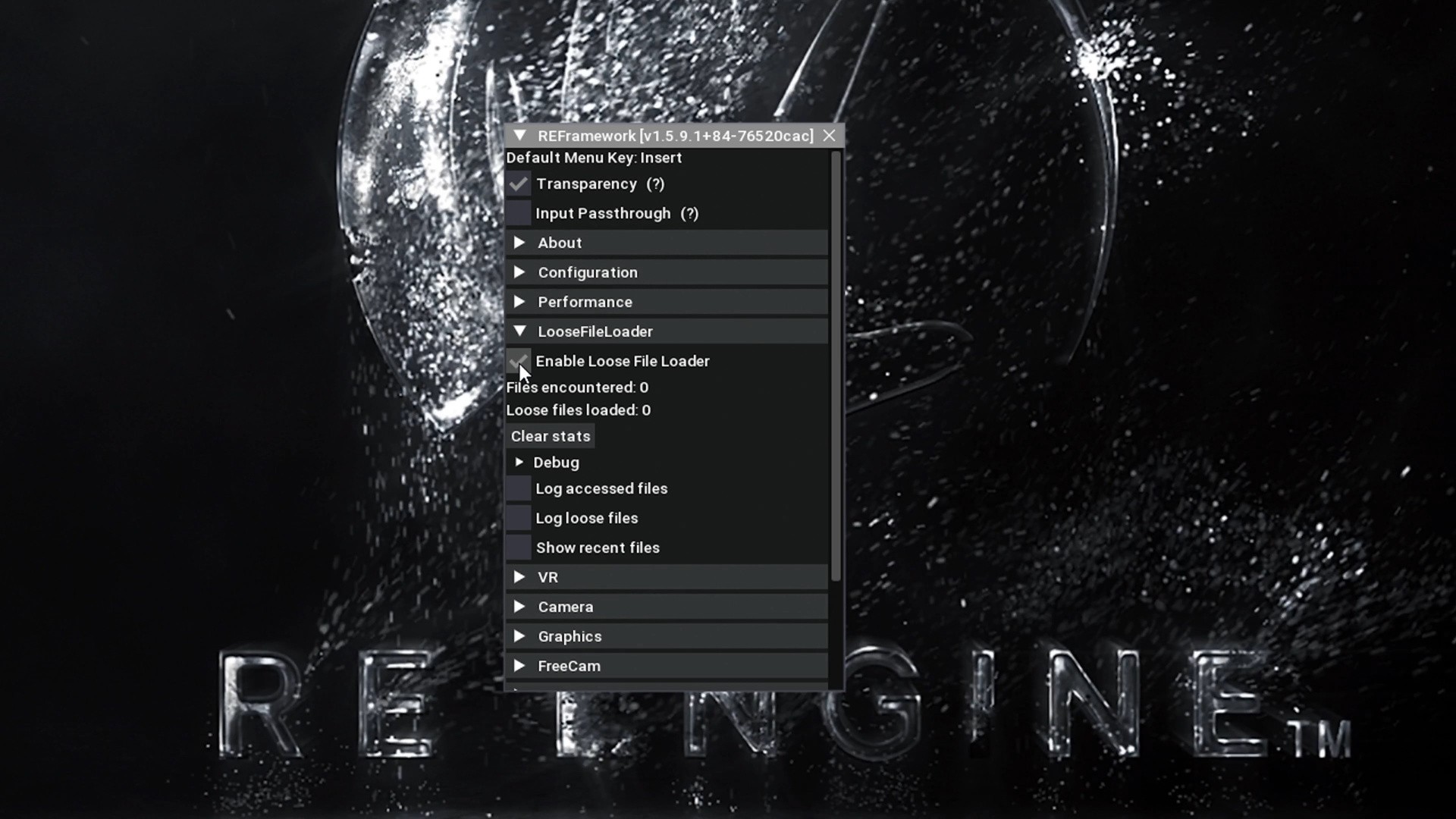
The above video walks you through the process, which requires downloading the latest versions of REFramework and MHW Tex Decompressor. With these files downloaded and placed appropriately, start Monster Hunter Wilds normally, at which point you should see the REFramework menu appear. (If you don't, tap the Insert keyboard key to load the menu.) Toggle the option shown in the image above before tapping your keyboard's Insert key to save the option. Quit the game, then load mhws-tex-decompressor.exe and follow its instructions.
Doing this replaces the game's default GDeflate-compressed assets with uncompressed ones, so that MHW can pull them directly during gameplay. In our video, we demonstrate the night-and-day difference in playing the game with this modification. The camera-turning stutter we'd found is now gone, along with other spiky frame times, on an RTX 4060 with 8GB of VRAM while running the game on "high" textures. So, remarkably, and counterintuitively perhaps, giving the VRAM-constrained 4060 more data to deal with actually results in smoother performance.
Sadly, the MHW mod doesn't deliver the same results for its optional "high-res texture DLC pack." Going through the process of installing and decompressing those assets will indeed hog more of your PC's storage space, but those higher-res textures don't appear in the game using this process as of press time, instead defaulting to the game's normal "high" texture setting.
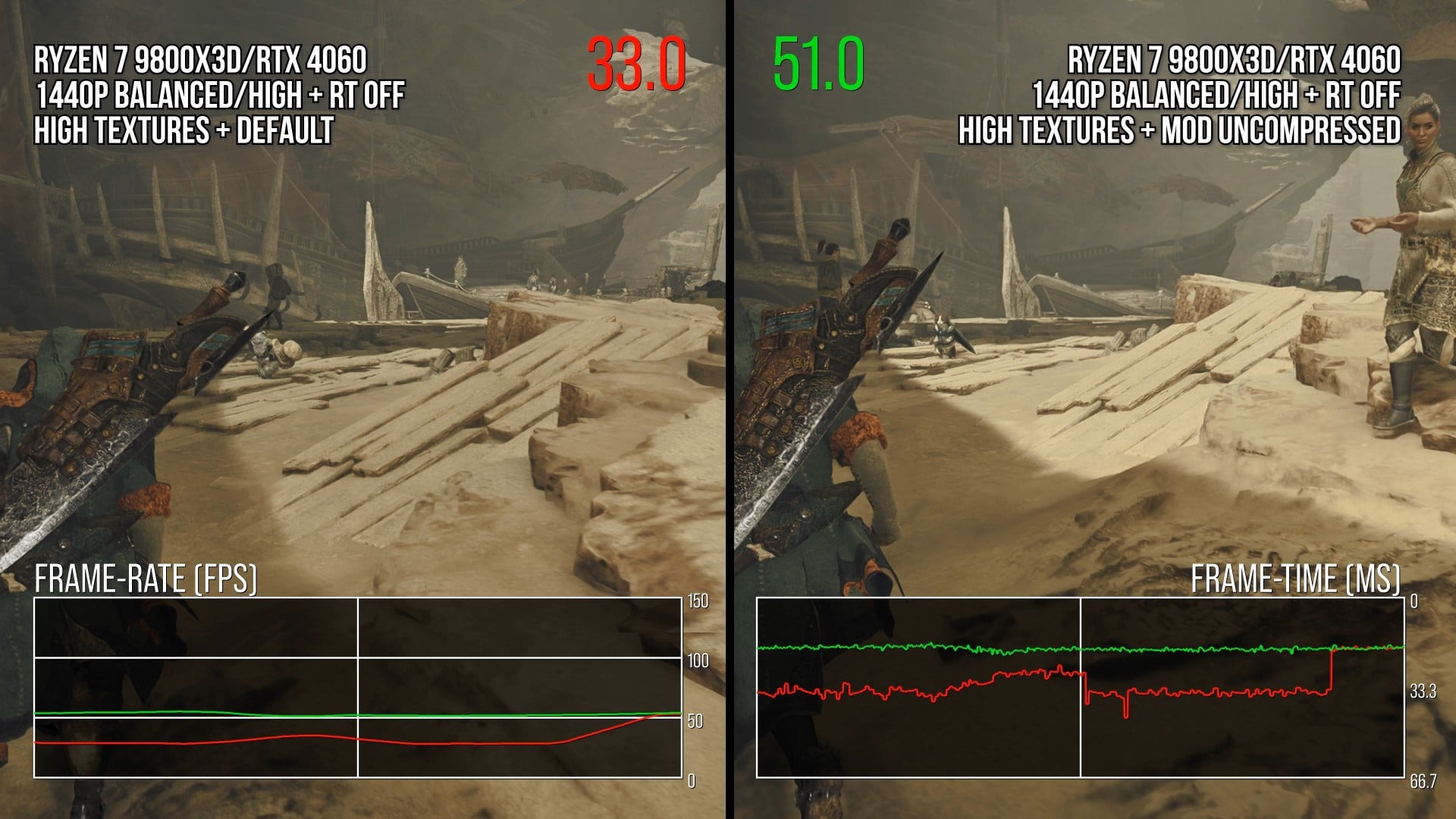
But the process as described above still offers a vast visual improvement for 8GB VRAM GPUs, and it's only increasing the game's installed texture size from ~24GB to ~41GB.
Doing this means your GPU isn't spending mid-game cycles operating a GDeflate decompression pass on the default, shrunken texture pool - a task we know the GPU is doing, despite MHW's menus saying otherwise, by looking at real-time metrics via the Special K injection front-end. We additionally confirm using CapFrameX analytics that the game's PCIe reception value (PCIe Rx) is substantially larger per second with this mod enabled.
Hence, we're trading off upload bandwidth and storage space for a drastic culling of frame-time spikes. This is an easy trade to make, just one worth noting.
And it's one that at least another recent game has made on your behalf without you necessarily understanding why. God of War Ragnarök on PC weighs in at a staggering 190GB as installed on a PC, compared to 84GB installed on a PlayStation 5 - an install-size jump of 126 percent. Meanwhile, other recent PlayStation-to-PC port siblings have slimmer install-size gaps between their console and PC versions; The Last of Us Part 1 is 26 percent bigger on PC, while Ratchet and Clank: Rift Apart is 90 percent bigger.
When we re-run the tape on those Sony games' PC ports, we indeed see the trend of Ragnarök performing better than the other two games in ways that align with texture decompression hiccups. TLOU1 in particular launched in a state that was unfair punishment for 8GB VRAM GPUs, and despite eventual patches, it's still not perfect. Perhaps similar decompressed-texture options could be provided to owners of those PC ports with the SSD space to spare.
So we hope more game developers address this issue, whether in brand-new games or in patches to existing titles, by offering their players the choice to skip texture decompression in favour of larger texture downloads.

Comments 1
Great fix. Easy decision to make if you have the storage.
Show Comments
Leave A Comment
Hold on there, you need to login to post a comment...