
 by
by 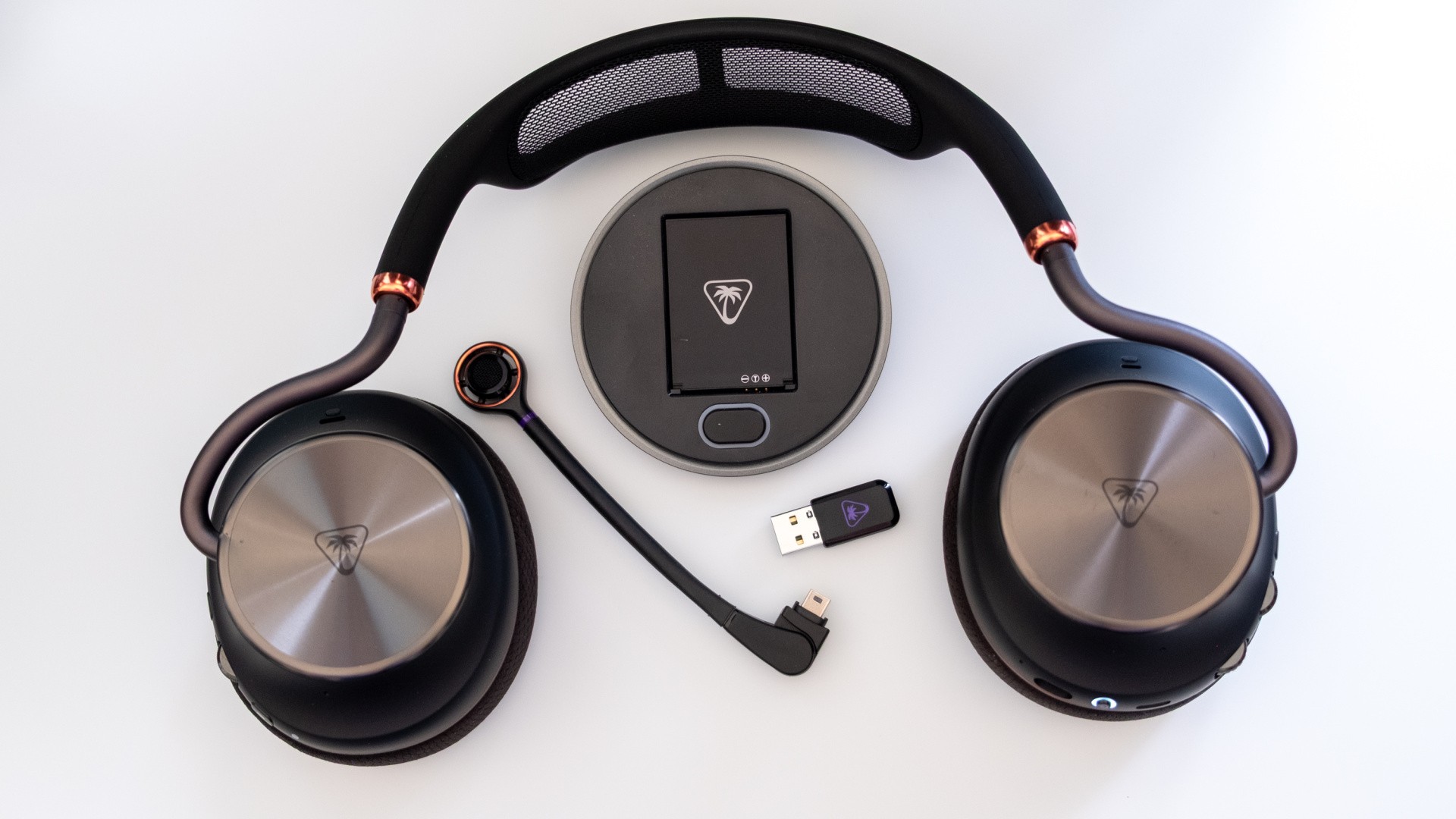
The best feature of my favourite gaming headset, the SteelSeries Arctis Nova Omni, is that it comes with two batteries and a docking station. When one battery is running down in the headset, the other is being charged up in dock. Just like that, you're never running out of battery again - and, at worst, you're spending 15 seconds swapping from one to another.
Turtle Beach's new £300/$350 Stealth Pro 2 flagship headset performs exactly the same trick, with two batteries and a charging dock, while also adding some fresh ideas into the mix, bundling in active noise cancelling and improving comfort significantly over the original Stealth Pro. That makes it the best headset that the American firm has ever made - even if it's not quite as polished as SteelSeries' latest.
How does it actually work? The Stealth Pro 2 takes a legally distinct approach by having each PC or console connect to its own USB dongle, whether that's the battery-charging dock or a smaller dedicated USB stick, rather than a single dock with multiple inputs. In my case, I hooked up the dock to my PC and plugged the smaller stick into the PS5 downstairs - something that isn't possible with the SteelSeries single-box solution.
What brand is your current gaming headset? (122 votes)
- Logitech
- Razer
- SteelSeries
- Corsair
- Other
Note that PS4, Switch and Switch 2 are all supported too, while Xbox variants of the headset add support for Xbox's proprietary audio solution. Swapping inputs is accomplished by pressing a button on the headset; two more "CrossPlay 2.0" dongles can be purchased separately to swap between up to four total systems via 2.4GHz plus simultaneous Bluetooth.
The system worked splendidly in my testing, with the headset jumping between sources with only a second or two of downtime and maintaining a solid audio link even when several rooms away. The chief difficulty was actually learning where that swap source button was, as both earcups sport a similar layout with a small button at the top, a dial in the middle and either a second dial or a second small button at the bottom. Thankfully the power button is right at the bottom of the earcup and easier to distinguish by feel; turning it on also provides a useful battery read-out as you start play. You can expect around 40 hours between swaps.
That longevity is useful too, because once you've started playing a game or listening to music with these headphones, you might not want to stop for a while. The audio quality delivered by the 60mm drivers is impressive, with detailed mids and surprisingly controlled bass - though highs can be a bit fatiguing in some musical genres. The soundstage is relatively wide for a closed-back headset and positionality is good too, making this a reasonable choice for more competitive fare. The detachable mic also lives up to its end of the bargain, providing clear audio with or without AI noise cancelling enabled. The quality isn't quite podcast-level, but it's a lot better than many rivals.
It's also possible to tweak the EQ or enable Dolby Atmos via the Turtle Beach Swarm 2 app if you prefer a different sound signature. I prefer standard 2.0 audio for most games, but it's good to know that the option is there if you need it. You can also rebind the left-side button and dials from a handful of preset options, engage special modes, adjust the strength of the ANC and so on. I also liked the option to set some headset functions to trigger via keyboard combos - so you could make a button to toggle ANC or engage "superhuman hearing" to highlight enemy footsteps without needing to take your hands off the keyboard.
There's also a mobile app for tweaking settings via Bluetooth, which connected immediately without manual pairing and offered easy access to most features apart from EQs. This might be the best headset app for Android I've tested - well done.
Despite its capabilities and sensible layout, the Swarm 2 PC app proved to be the most annoying part of the testing process for me, as it went through a period of freezing on startup and seemingly crashing onto a nearly solid black screen, with no recourse but to completely restart the app. I was eventually able to correctly install a firmware update for the headset and transmitter - taking nearly 30 minutes! - and it was smoother sailing after that.
The only other annoyance was the weight of the headset. The Stealth Pro 2 is beautifully designed and feels premium, but it does clock in at nearly 400 grams - and 50g heavier than the SteelSeries Arctis Omni that I use most often. The design does feel well-balanced, but there's still a fair amount of pressure on the top of the head after a lengthy session - and I'm not entirely convinced by the soft mesh used here, which feels eminently tearable. Still, it's held up fine for the past month, and I do appreciate that the headset doesn't feel overly clampy while wearing glasses.
The premium price point here means that the Stealth Pro 2 needs to be nearly perfect to be worth recommending, and thankfully these new Turtle Beach headphones do hit that high bar. The software and the weight are the only real negatives I can mention, and both are possible to live with given the excellent audio, solid microphone, long-lasting battery and the flexibility of multi-device connections.
If you're lucky enough to have the £300/$350 Stealth Pro 2 within budget - or you can wait until they're discounted to more affordable levels - then this headset is well worth considering alongside the best available from Razer, Logitech and SteelSeries.