
 by
by 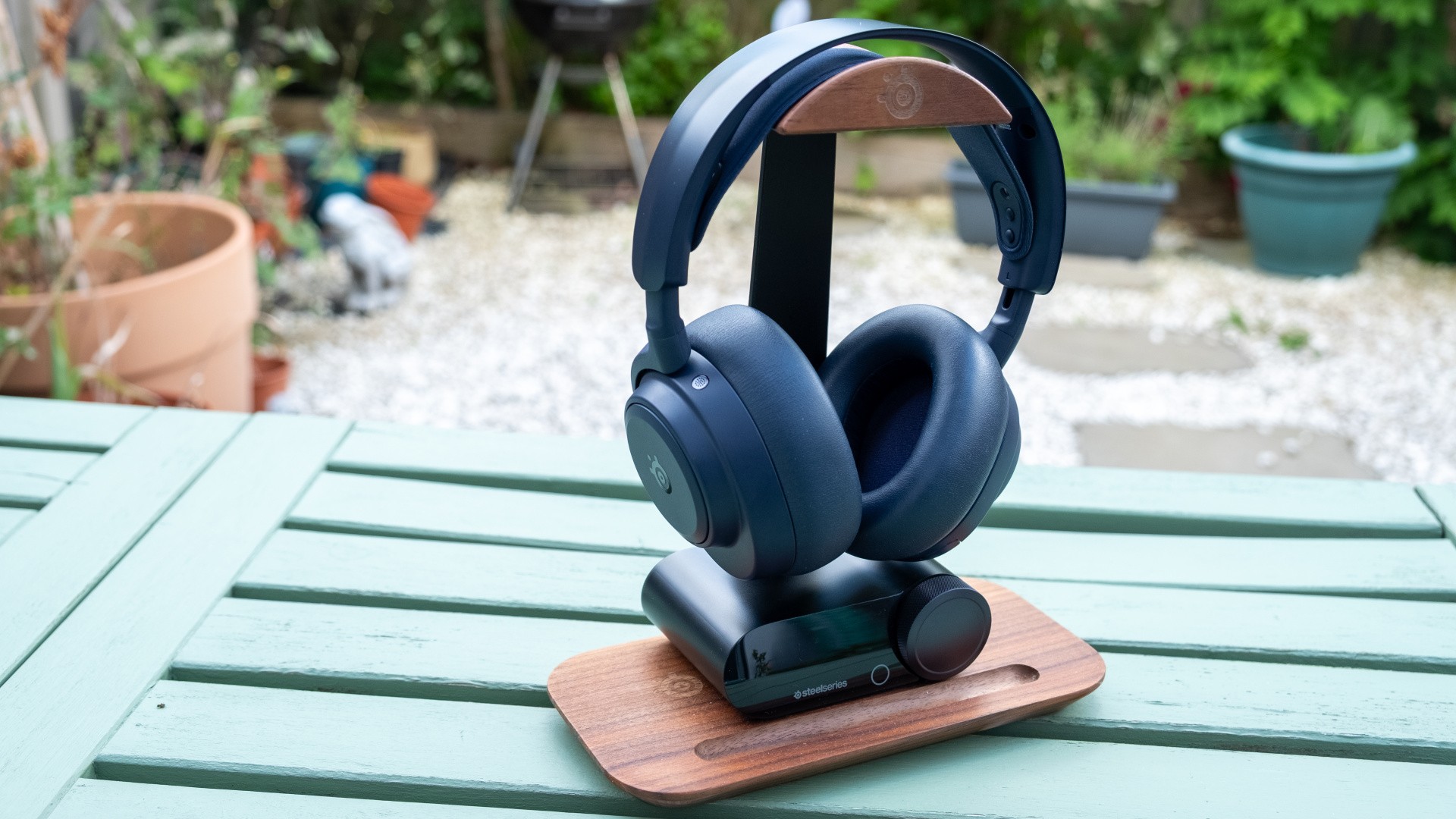
If you want the unbelievable luxury of using one wireless headset for three or more gaming systems at once, your best bet was SteelSeries' $600 Arctis Nova Elite. Now, you have a cheaper alternative in the Arctis Nova Pro Omni, a $400 headset that offers the same impressive connectivity options, plus a dual battery system, high-res audio support, mobile app and active noise cancelling. It's a package that is total overkill for use with a single PC or console, but it makes more sense as the number of connected systems increases.
As well as being a smartly cut down version of the 2025 Arctis Elite that eschews the more advanced materials of that luxury headset, the Omni is also a big upgrade over the original Arctis Nova Pro Wireless headset, which was released in 2022 and revised in 2025 with a Gen 2 model. For a list price that's $50 more, you get a mobile app that unlocks convenient, game-specific EQs for console players, an extra USB input and a new navy blue colourway. And if you're comparing against the original Gen 1 model, there's also a benefit to battery life - up to 30 hours per battery - plus charging speed and mic quality.
As the name and price tag suggest, the Omni is intended to be the only headset you'll ever need, a solution for all sources and all seasons. As well as connecting to three USB devices, one 3.5mm source and Bluetooth (up to four sources simultaneously) for gaming or working at home, you can also take it on flights or to the gym, aided by the comfortable ski-goggle-style headband, rotating ear cups, low weight, direct USB-C charging and ANC. Whether or not you prefer an over-ear design for those more lifestyle use cases is up to you, but the Omni is a comfortable option that doesn't feel out of place when you're out of your place.
For me though, the killer use case for the Omni is the experience at home. I've already gotten used to being able to connect multiple PCs and consoles to the Arctis Elite I reviewed last year, so swapping in the Arctis Omni was the work of a moment. The Omni has the same useful GameDAC hub as the Elite, though the knurled volume wheel is actually nicer on the cheaper Omni. On the side, the battery charging slot allows you to keep one battery topped up while the other is being used inside the headset. That means you never need to wait for the headset to charge at home, you just swap the batteries and the headset automatically powers back on within a few seconds.
Around back, you'll find three USB-C ports which can be used with PC, PS4, PS5, Switch and Switch 2, and of these three, one of them also has the special sauce that lets it work with Xbox Series X/S and Xbox One consoles. There's also a line-in port for pre-USB electronics and line-out to connect your speakers to the same system. It all works seamlessly, with up to two active USB-C sources being selected automatically, plus the line-in and Bluetooth 5.3 connections. When the headset is turned off, the sound automatically routes to the line-out port so you can listen on your desktop speakers. It's an excellent system, and is for me the single largest reason why the Arctis Nova Omni sits above other high-end wireless headsets.
While you can make a surprising number of changes on the GameDAC itself, using the big wheel and a back button to enter various menus, the PC and mobile apps are more capable.
The PC app is a little complex for my tastes, especially when "streamer mode" is enabled, but you do get a nice parametric EQ, plenty of pre-made EQ profiles that suit specific games, plus the ability to route audio to and from various devices. You can't control the volume using the OS-level volume controls and the extra audio devices are a little annoying, but it all works pretty well.
The Android or iOS mobile app is arguably a better experience, with a more carefully considered feature set and the ability to make changes live over Bluetooth while the headset is connected to consoles via USB. That's awesome for activating game-specific profiles, something console players haven't historically had access to, and even the default Arctis Nova Pro Wireless can't do. The app is also useful for Linux, where the Windows app doesn't run by default - though it is theoretically possible to install it via Lutris.
Once everything is set up, you're free to enjoy the Omni as a headset. I played through Diablo 4's Lord of Hatred expansion on PC using the Omni and was impressed by both the beauty of the soundtrack and the disgusting meatiness of the on-screen action. (I'll never forget the wet sound of slain goatmen in the original Diablo, and Diablo 4 brings me right back there.) The headset on its default EQ doesn't feel overly bombastic, with a more clean, neutral and detailed sound signature, but bass is still present and correct - and there's room to embiggen it slightly if that's what you prefer. Sounds that you're meant to hear distinctly, like the imminent explosion of a slain foe or the "ting!" of a rare item, come across clearly, and it's clear that SteelSeries has tuned the Omni to emphasise the most useful frequencies for gaming rather than have a strictly neutral presentation.
It's a similar story in more competitive games. I loaded up Counter-Strike 2, Battlefield 6 and Marathon, and in each of these titles it's possible to hear important sounds like footsteps fairly easily, even in acoustically busier moments, and especially with a game-specific preset loaded to bump up these frequencies. Communication is more critical here, and the mic built into the Omni is clear - if not as full-bodied or flattering as proper desktop mics. The AI noise cancelling that was only available via the SteelSeries software on PC is now built into the headset, so it works on all platforms. I also appreciate the fact that the controls on the side of the ear cups are easy to distinguish by touch, so you can make quick adjustments either on the headset itself or using the big wheel of the GameDAC.
The Omni is also a high-res capable headset, so I resumed my Tidal subscription that I wheel out to test such headsets from time to time. As with the Elite, the sound quality here is excellent for a streaming service, but I'm not enough of an audiophile to point to a specific advantage from engaging the 24-bit 96kHz connection versus the standard 16-bit and 48kHz.
The sound here lacks a bit of the fullness and richness that made the Elite such a strong option even against higher-end headphones, on account of using more ordinary 40mm neodymium drivers versus carbon fibre drivers and brass surrounds, but the Omni certainly holds up as a pleasant listening companion. Bass is controlled, mids are slightly restrained, and treble is clear and detailed. It handles most musical genres quite well, with only tracks that emphasise sub-bass detail or mastered with quite a bright signature feeling ill-suited to the presentation here.
What do you think of SteelSeries Arctis headsets? (156 votes)
- I have one and like it
- I have one and don't like it
- I don't have one but I would consider one
- I don't have one and I'm not interested in one
To sum things up, the Nova Pro Omni is a solid gaming headset that balances good comfort and usability, capable ANC, a high-quality microphone and detailed sound. As a gaming system though, it is absolutely superb, and ranks alongside the Elite as the best option for simultaneous use with multiple gaming systems. The upgraded GameDAC is the key here, with its effectively infinite battery life, convenient controls and support for up to four audio sources providing a huge amount of utility for anyone juggling multiple PCs and consoles in a single room.
With that in mind, I'd easily take the Omni over its closest competitor, the Astro A50 X Lightspeed, which is a great headset but not quite as convenient or flexible as the SteelSeries thanks to its more ordinary drop-in charging dock. The Turtle Beach Stealth Pro 2 also runs along similar lines and I have it in for review, so I'll have to wait and see if it can compare.
The original Arctis Nova Pro Wireless is still great and worth considering for people with two systems, but going for the Omni with its third USB source and mobile app support feels well worth an extra $50. However, for people that primarily game on just one system, there are plenty of alternatives around the $100 to $150 mark that can do the job for much less, including Razer's BlackShark V2 Pro, Logitech's Pro X Lightspeed or Corsair's HS80 Max.