
 by
by 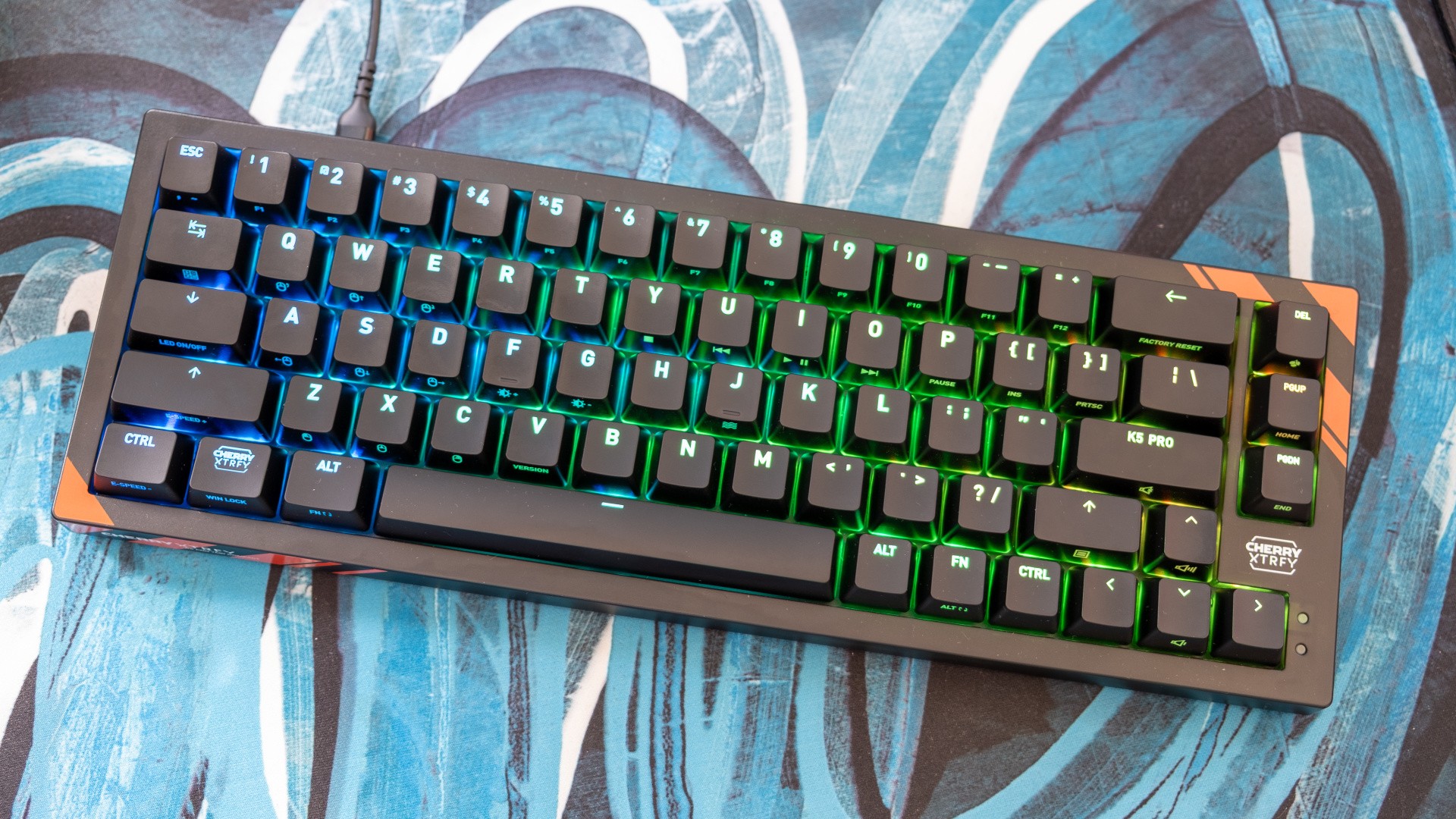
I'm a big fan of the co-developed Cherry Xtrfy gaming keyboards - a collaboration between the original designers of the MX-style switches in almost every mechanical keyboard (Cherry) and smart peripheral makers spun out of a Swedish esports team (Xtrfy). Yet their latest competition-focused offering, the K5 Pro, seems to have sacrificed too much to implement the latest trend in gaming keyboards, TMR switches.
Tunnelling magnetoresistance switches are a really cool technology - they offer much of the same gaming advantages as Hall Effect switches, such as faster response times and fully analogue inputs, yet they consume far less power and even offer benefits in terms of precision. They are expensive though, and for the K5 Pro it feels like there wasn't much funding left over for higher-end materials for the keycaps and chassis.
That makes the K5 Pro feel a little cheap - which is weird for a keyboard that costs $185, £140 or €150. I think this is largely down to the keycaps, which use cheaper ABS plastic instead of the thicker, more textured PBT preferred by most boutique vendors. I appreciate the shine-through backlighting, especially the side-printed secondary functions that make the 65 percent layout here much easier to cope with, but the actual skin-to-keycap contact just feels off. I've even read reports online of the keycaps developing a shine over time, which is something that I haven't experienced since the dawn of the modern mechanical era back in the 2010s. The switches themselves are at least nicely lubricated, and the soft linear keypress feels progressive.
The actual body of the keyboard is also plasticky, though it's strong enough to feel substantial even when twisted. I don't mind the red/orange stripes that adorn the bottom left and top right corners of the board for a bit of added flair and the textured bottom which reveals a hint of the RGB lighting above is pretty nifty too. For a $100 keyboard, I'd be satisfied - but for something in this price range, I feel like a metal chassis or at least PBT keycaps isn't too much to ask.
I could at least install a set of PBT caps myself if I wanted to upgrade the feel, though finding a set with the correct heights for the Delete, Page Up and Page Down keys on the top right of the board might be a bit of a challenge - though nothing a slight bodge couldn't fix. Similarly, the included Cherry TMR switches are also hot-swappable for alternative magnetic options, though I'd call this more useful for repairs than for fully removing the TMR switches you're investing in with this particular keyboard.
In terms of gaming, the K5 Pro performs well - as you'd hope/expect. The TMR switches and 8000Hz polling rate are pretty much what you'd want for competitive gaming keyboard, with fast, reliable inputs and the FPS-focused features like SOCD (turn-on-a-dime strafing), rapid trigger (quicker recognition of key presses and releases) and adjustable actuation levels (from a 0.1mm hair trigger to a full-depth 3.2mm of travel). Modern mechanical keyboards with traditional, optical or Hall Effect switches are already pretty rapid, but the K5 Pro subjectively feels fast and responsive.
These features and other adjustments are enabled and controlled from the MagCrate app, which is available for both Windows and macOS - nice. The software isn't the best I've used, sometimes losing connection to the keyboard, and it has some weirdly translated English text, but on balance it's fine. Pretty much every option you could want is here, from remapping keys and setting up the lighting to more core changes like adjusting the polling rate, recording macros and testing out those FPS functions.
However, no web app exists, something that a lot of peripheral makers have switched to over the past couple of years. I like web apps as it means I have less software running constantly on my computer, with no real loss of functionality. Still, it's also possible to use the keyboard sans software, as some adjustment is possible via Fn button combos alone.
The bottom line is that the keyboard market is extremely competitive these days, and including the latest tech isn't enough to guarantee a great final product. The TMR switches used here are beyond reproach, as are the board's gaming credentials in general, but a slightly sub-par software solution and cheap-feeling keycaps for a board of this price make it hard to recommend to most people.
It's a similar feeling to that I had with the Logitech G512 X I reviewed last week, which was also an expensive TMR switch keyboard that was let down by some weird choices. When Hall Effect keyboards are cheap as chips and functionally identical, these pricey TMR boards don't seem to do quite enough.
The Cherry Xtrfy K5 Pro unit tested here was provided by Cherry Xtrfy for review.