
 by
by In theory, DLSS dynamic multi-frame generation is one of the best innovations Nvidia could add to its existing amplification technology, taking us one step forward to a time where you simply dial in what frame-rate you want and let the GPU take over. By allowing frame generation to take control of the multiplication factor, the GPU increases the amount of generated frames in heavier scenes, reducing it when the load is lighter. Put simply: maximum frame-rates, lower latency. I was really looking forward to this, but the end product feels like it's more of a beta - and there's a key problem that needs addressing before I'll actually use it.
DLSS dynamic multi-frame generation actually delivers another innovation beyond changing the multiplication factor - the arrival of a new ML model, dubbed Preset B. This aims to address the most noticeable key weakness with frame generation - the smearing of persistent UI elements, such as on-screen HUDs. However, it only works on a sub-set of games - those where UI elements exist on a different plane. Regardless, it's a nice addition and I would hope to see better adoption over time.
Primary testing was carried out on a Ryzen 7 9850X3D system with 32GB of 6000MT/s DDR5 paired with an RTX 5090, connected to a 4K 240Hz QD-OLED panel - the Alienware AW3225QF and most of my experiences were with Cyberpunk 2077 in RT Overdrive mode. It's a game I know well in terms of its CPU and GPU-based bottlenecks and with path-tracing enabled, even the mighty RTX 5090 can find its limits. Or not.
Part of the testing involves figuring out how to "game" the dynamic frame-gen algorithm to make it more... well, dynamic. You can achieve this simply by changing the DLSS super resolution setting. By using the quality mode - effectively path tracing at native 1440p (!) - you can ramp up the GPU load and push the frame-gen factor up. By swapping back to DLSS performance mode, GPU load lightens and you should expect lower frame-gen multiplication factors.
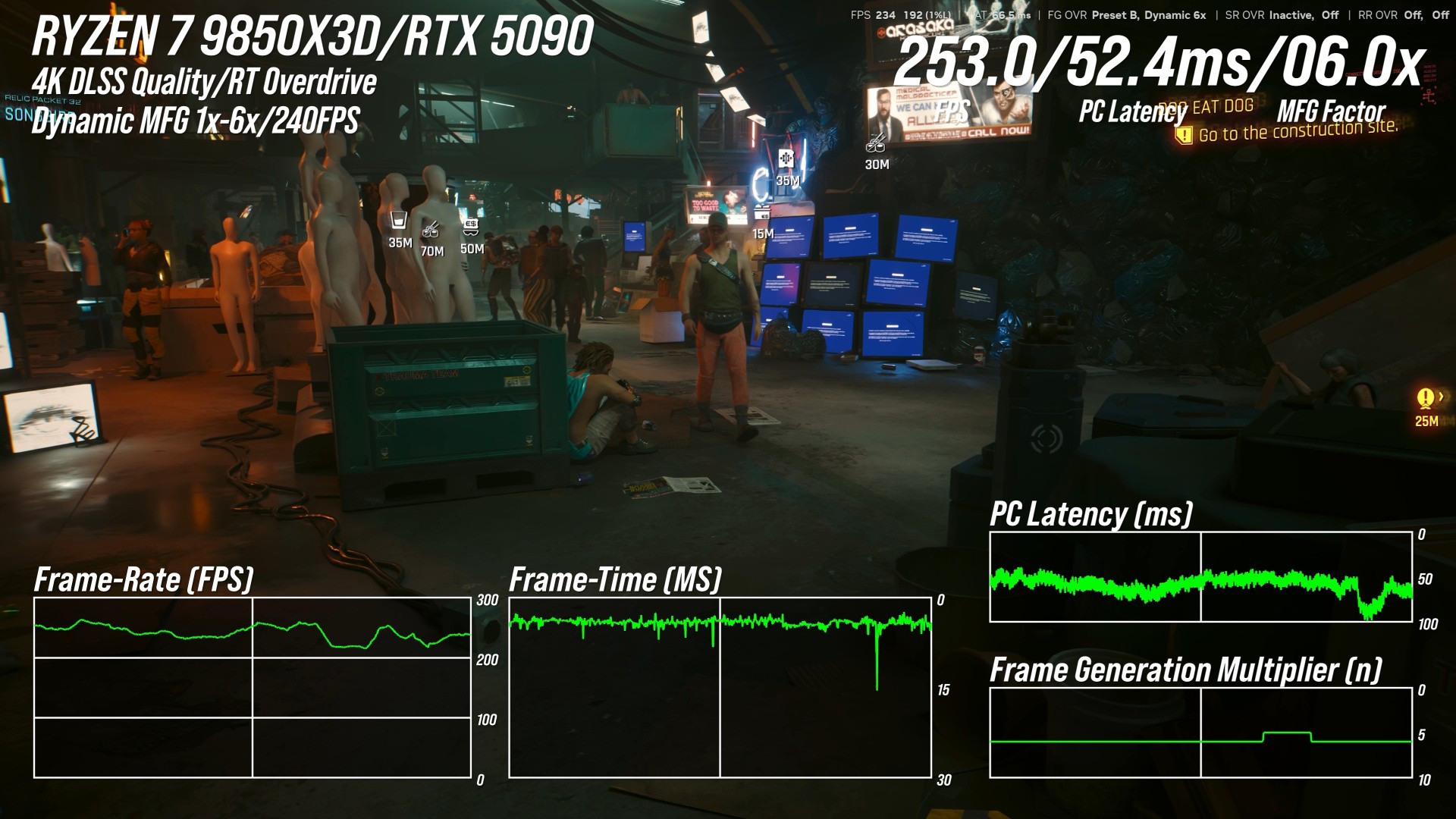
So, why is this a good thing? Why not just run at the best-fit MFG factor, as was the case before? Well, the lower MFG factor, the higher the base frame-rate, which in turn means a faster, more responsive game. For example, at 240fps with 6x MFG, the game runs internally at 40fps. But if you can hit 240fps with just 2x MFG, internal frame-rate will be 120fps, delivering a considerably lower latency. That's a somewhat exaggerated answer, but ultimately what you want is to be able to tap into frame generation without having to think too much about the base frame-rate at all - and dynamic multi-frame generation is a key step forward here.
However, there are issues. First of all, I found that with my Alienware screen and a target output of 240fps, dynamic multi-frame generation would often overshoot the target. And when it does that, my beautiful G-Sync screen starts to exhibit screen-tearing. One of the best things about VRR technology is that tearing should become a thing of the past. If the frame-rate cap isn't respected, you can lower it. I tried 220fps. Even here, we could still overshoot the VRR window. Nvidia's frame-rate limiter is more of a general advisory cap as opposed to a hard and fast limit on performance.
But there's something else. Even within the VRR window, it doesn't look right. Slow panning to the left and right reveals mini stutters or hitches that I've not seen before. Logic suggests it isn't screen-tearing but the signature "wobble" of v-sync off in a high refresh rate container does look very similar. Are my eyes deceiving me? To test, I turned off dynamic multi-frame gen, manually adjusted the multiplication factor to the same level, then turned on v-sync at the system level via the control panel. This ensures I won't exceed the monitor refresh rate. And now, everything looks fine. No more wobbles or micro-stutters.
For the record, I still think the combination of the hardware v-sync option set in the control panel, paired with a fixed frame generation level is the best for me - but it might be different for you. Certainly, dynamic frame-gen does indeed seem to deliver lower latencies - but for me, the trade is too high. Inconsistencies in image presentation are more bothersome to me than a small increase in input lag.
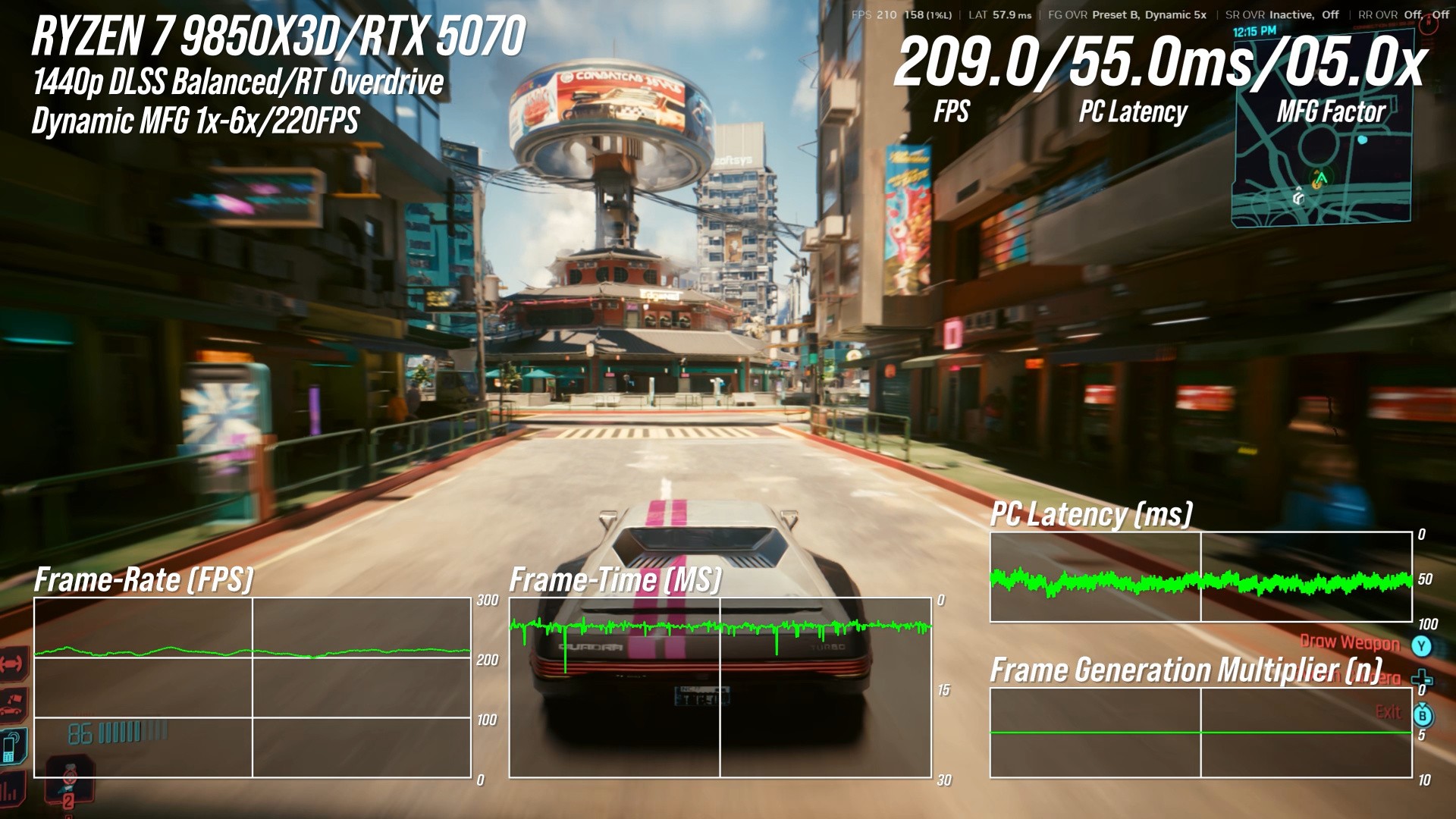
Per the DF Direct clip embedded above, I also tested dynamic multi-frame generation on an RTX 5070 - which, according to the Steam Hardware Survey - is the most popular desktop RTX graphics card. I retained RT Overdrive settings, dropping down to DLSS balanced mode and 1440p resolution with a 144Hz target. With the same caveats, the technology worked - and for me, that's important. While frame generation will present difficulties for lower-end cards and especially those with 8GB framebuffers, my personal expectation of a 70-class product is that it should be capable of the same things as a 5080 or even 5090, just at lower resolutions with potential settings reductions.
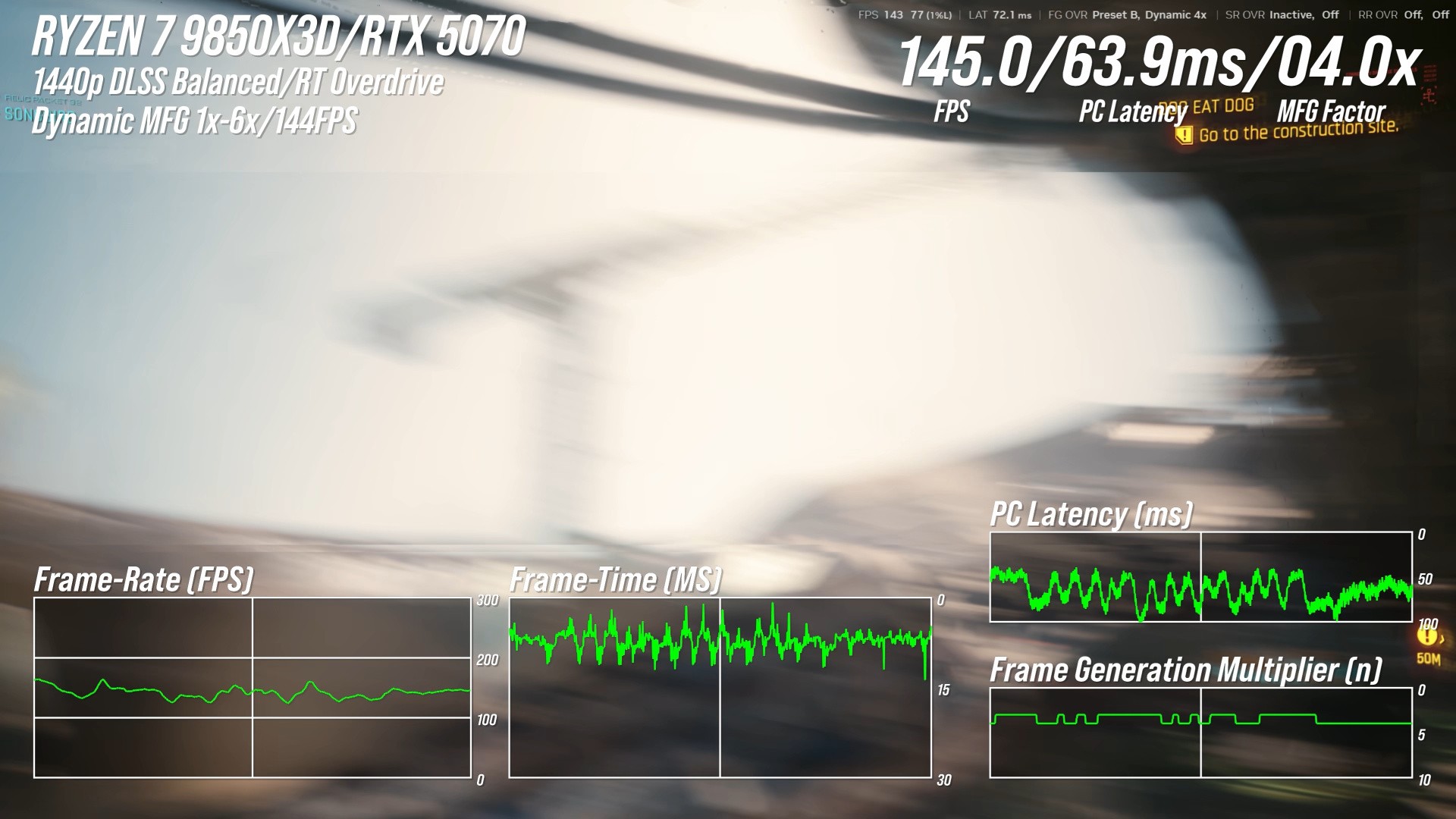
My RTX 5070 testing also included attempts to ascertain how fine-grain the change in multi-frame generation factor is. By waggling the mouse between the view of the sky and then towards the dense market in Cyberpunk 2077, we should be putting the algorithm fully through its paces. There, we found some issues. Frame-times and latency went haywire, which isn't ideal, but we did find that the minimum time taken to change multi-frame gen factor - around 150ms, but that is at the 144Hz limit. It may well be more responsive across higher refresh rates.
I also spent some time looking at Hogwarts Legacy - a game that Nvidia recommends for showcasing the improvements of Preset B in handling UI elements. This is indeed the case, but I found the overall experience with DMFG unsatisfying owing to intrusive stutter and judder. This is unlikely to be Nvidia's fault, more the state of affairs with Hogwarts Legacy itself, which never presented in a satisfactory manner on PC.
However, I also found a few bugs that definitely are related to dynamic multi-frame generation. Sometimes dynamic frame generation isn't actually dynamic. In Cyberpunk 2077, I had some sessions where the multiplier stuck to 6x, even when I reduced rendering load. Tellingly, ALT-TABing out and then back into the same scene in Cyberpunk saw the multiplier reset to the more plausible 4x. Something's not right there, adding to the sense that the feature is in more of a beta phase at the moment: feature complete but requiring more polish.
In summary, I'm glad Nvidia is putting the time and effort into delivering dynamic frame generation but the current version isn't quite there. When inputting a max refresh rate into the Nvidia app, the technology should actually work to that limit. We shouldn't be seeing screen-tearing with G-Sync when it overshoots the target, and whatever the micro-stutter is that I'm seeing, it isn't there when system-level v-sync is active, suggesting dynamic multi-frame generation is the issue. Unfortunately the new feature doesn't work with system-level v-sync, which is another limitation.
First generation technologies are far from the final product, of course. DLSS 3 frame generation itself launched without support for v-sync, after all, while the gulf in quality between DLSS 1 and the latest transformer model super resolution algorithms is vast. So, in a sense, I expected a work-in-progress, but perhaps not one with so many easily noticeable problems.