
 by
by 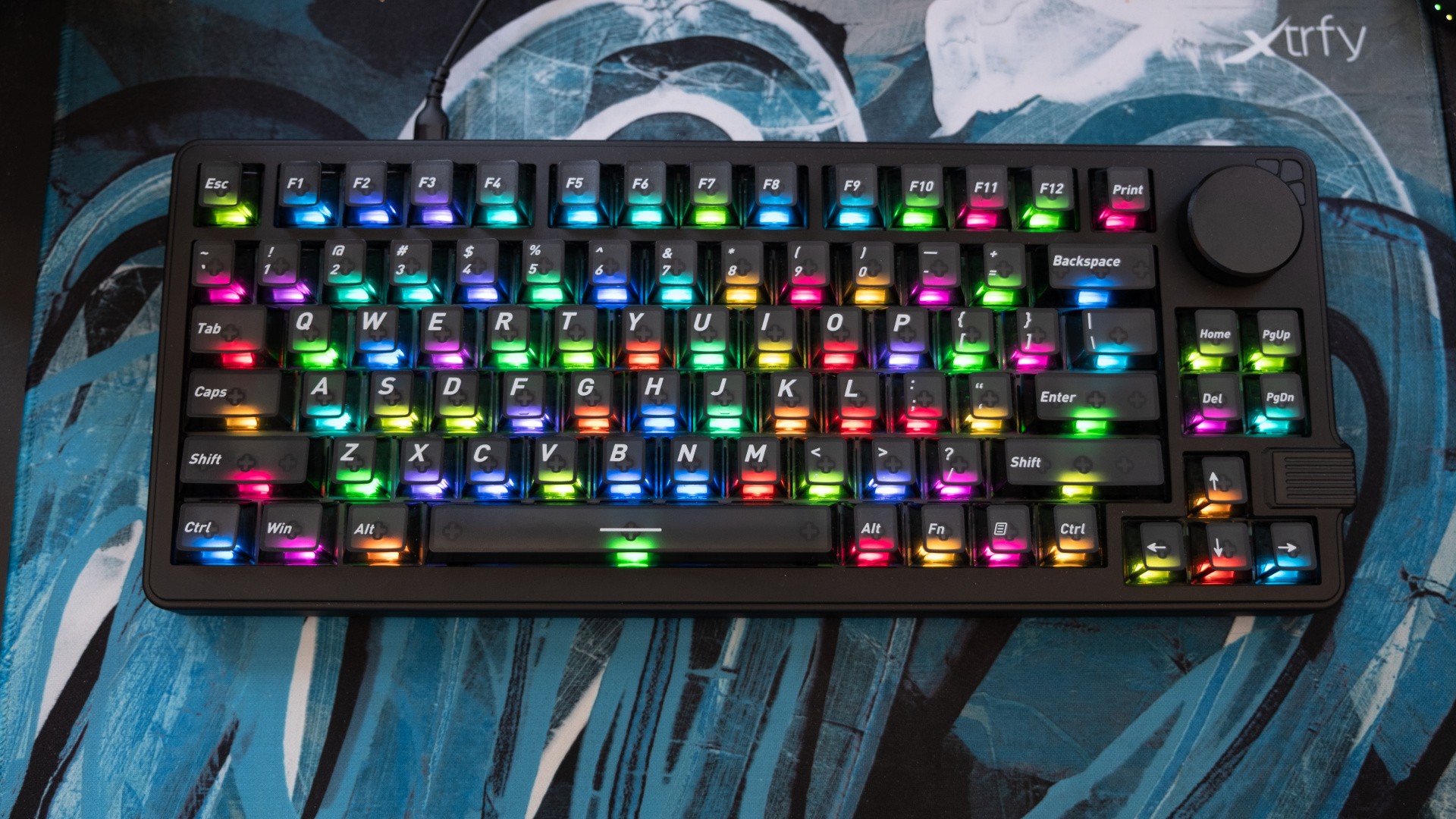
Gamakay is one of the best boutique keyboard makers right now, with the Chinese firm punching well above its weight alongside better-known domestic rivals like Keychron and Nuphy. The idea behind the NS75 is pretty typical of their efforts: modern specs and features, including sound-dampening, Hall Effect analogue switches and tri-mode connectivity, at a bargain basement price. At £62/$80, this is below the cost of many non-mechanical keyboards from Western brands, yet it delivers the repairability, customisability and key feel that makes mechanical so good in my eyes. In short, this could be a great introduction to modern mechanical keyboards.
Unlike many boutique designs, the NS75 looks professional, with a matte black chassis and black polycarbonate keycaps in a fairly standard 75 percent layout (that removes the numpad and a handful of less-used keys) with a big volume wheel in the upper right corner. Turn on the optional RGB lighting though, and you'll see the keycaps are semi-transparent, providing a burst of light that makes the keyboard easily usable in dark conditions and just looks nice. Of course, you're free to use a single colour backlight or none at all if you prefer a more mature look.
Inside, the switches are gasket-mounted for a softer travel, three layers of foam ensure typing produces a deeper pitched sound, while lubricated switches and stabilisers also make the action more smooth and linear. Actuation can be adjusted from 0.1 to 3.4mm, allowing you to dial in a more responsive feel and dial out typos, and and the sockets are hot-swap, allowing you to use other HE switches in the same family. The Outemu White Jade switches here are relatively inexpensive for brands to include, but I quite like the light action, which makes the keyboard feel responsive and pleasant to type at speed. Other keyboards offer more obvious tactile and audible clicky feedback, but the NS75 feels well balanced in terms of giving a good typing experience without being too unkind to anyone sharing your space.
The keyboard feels well constructed, despite its ABS plastic foundations, and only a tiny bit of flexion is evident when the keyboard is twisted. There are no rattles to be heard either - the NS75 feels solid. A simple on/off switch allows the wireless modes to be engaged, and two-stage feet prop the keyboard up off the desk if you prefer - though I like things flat for the ergonomic benefits.
There are some hidden features too. The textured outcrop near the bottom right of the keyboard contains a 2.4GHz dongle, allowing for low-latency wireless while the sizable 4000mAh battery allows, and via wired mode you can access polling rates up to 8000Hz - more or less a placebo in terms of actual latency reduction, but one that mainstream brands tend to restrict to their premium keyboards. As this is a Hall Effect switch keyboard, you also get access to FPS-focused features like SOCD (for faster counter-strafing), DKS (to bind multiple actions to one keypress) and rapid trigger (for faster inputs in general).
Software is handled via the Gamakay driver (downloaded software) or the Gear Hub (web app). I prefer the web app, which offers the same core functionality in terms of rebinding keys, recording macros, setting the lighting and adjusting the polling rate, but it's worth bearing in mind that the downloaded software allows for a few extra features, such as downloading shared lighting schemes or button layouts from the community. Unfortunately, I wasn't able to see any such shares during my testing, and I'm trying to work out why these weren't shown.
Testing the keyboard in MechWarrior 5: Mercenaries and Counter-Strike 2, the inputs felt perfectly crisp and responsive, while the 83-key layout provided better access to secondary functions than smaller designs. (For example, the YAML mod for MW5 adds keys for lighting modes and a commander's view, and these are bound by default to the navigation cluster that's often removed on 65 percent layouts or smaller.) The RGB lighting was useful for gaming at night, and there was still plenty of space for mousing around rapidly in Counter-Strike. Setting up the FPS features was slightly more elaborate than on industry leaders like Wooting, Razer or SteelSeries, but was perfectly achievable in the end.
I also found the NS75 a great companion at work, where there were just enough keys for common functions in Photoshop and Lightroom, a pleasant typing experience for writing up news stories and convenient volume wheel access for adjusting the background music I normally have going. However, the battery ran dry after less than a week of use with the 2.4GHz, even with the RGB set fairly low, so I'd recommend sticking to wired mode if possible.
Overall, it's hard to find much wrong with the NS75, especially given its extremely reasonable £62/$80 asking price. You get a lot of keyboard for the money, including all of the trendy features for competitive gaming, plus a design that works well for typing, programming and general computer use. For that reason, I'm happy to recommend this keyboard for a wide audience, especially if you've not used mechanical keyboards before or recently. This is a pretty excellent way to get (back) into it.