
 by
by 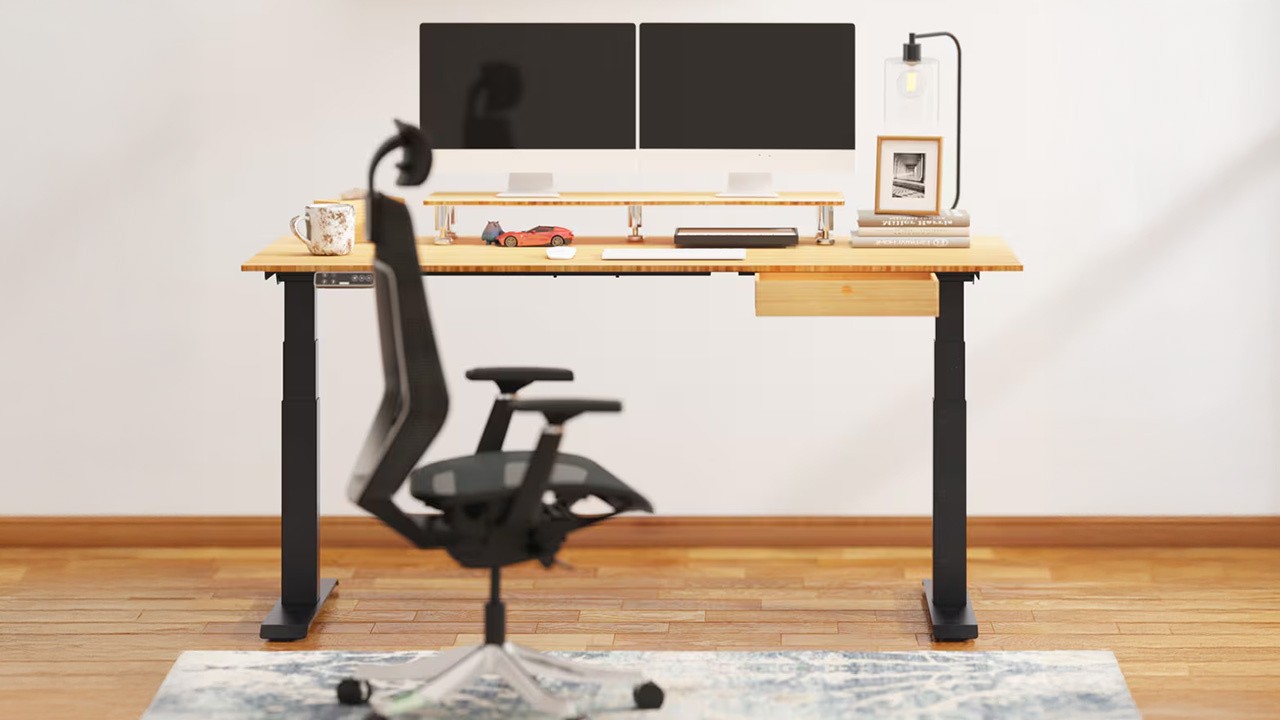
I would venture to suggest that a new piece of office furniture does not sound particularly "game changing" for the Digital Foundry audience in the same way that a new console or GPU architecture might, but I can say without exaggeration that the Flexispot E7 Plus desk is helping me on my journey to becoming healthier and to live a pain-free existence. So why is a motorised standing desk so important for me? Well, this is a review of a desk, but it's also the story of how playing games and working a deskbound job has caused serious damage - and how I'm going to need to rethink work and hobbies as I recover. And where I do those things is pretty important.
I have sat at a desk to play PC games and do office work for decades. Small desks, large desks, different chairs, but invariably with poor posture. For a younger person, this may not be especially problematic (in the short term at least) but I'm 35 now and not nearly as active as I used to be. In November 2025, my poor decisions finally caught up with me in the most mundane manner possible. Just by bending down to take a plate out of the dishwasher, my back seized up. All of sudden, sitting is painful, walking can be challenging or just impossible.
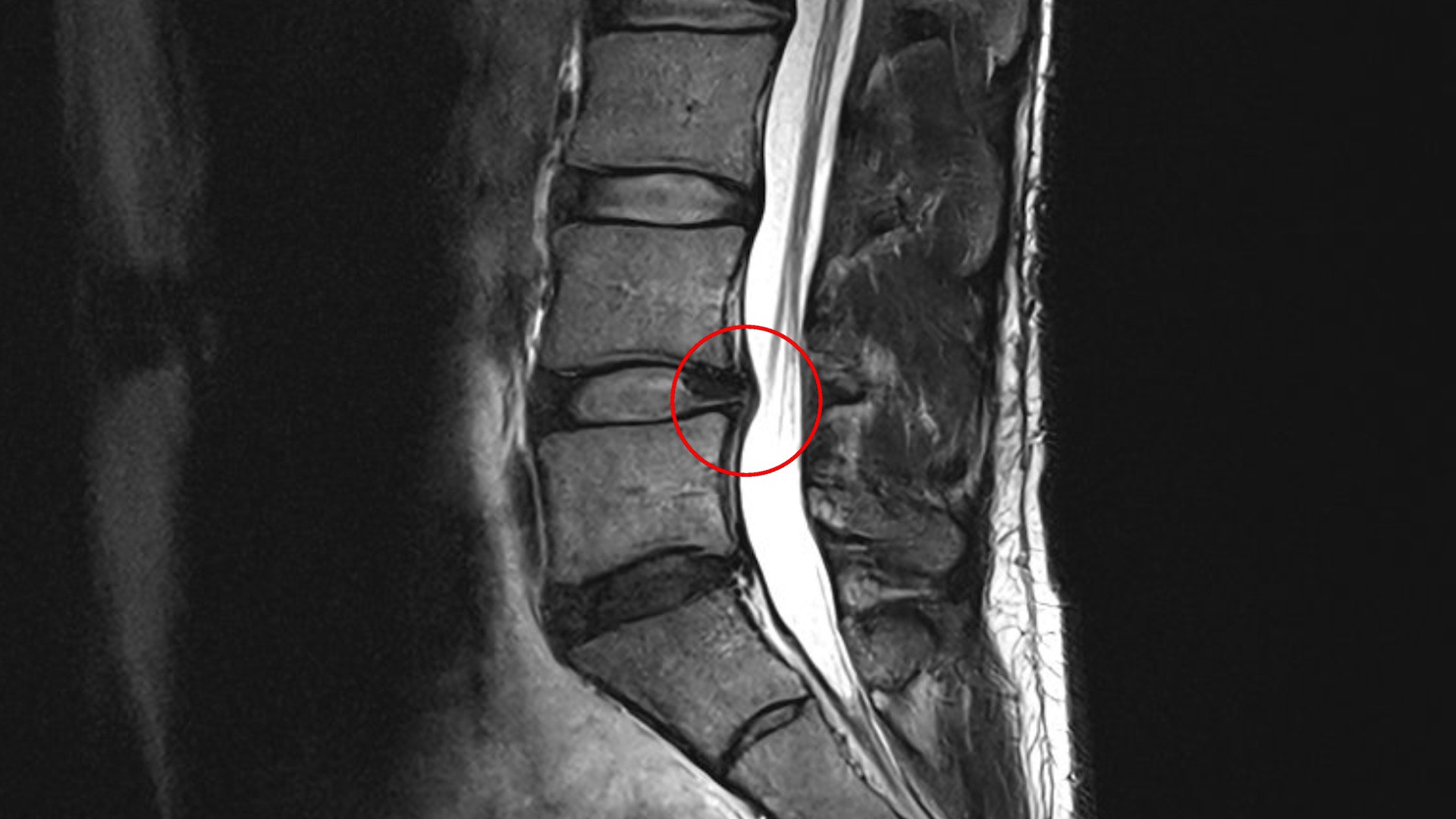
After a flurry of confused denial laced with pain, I learned almost two months later via an MRI that I have a lumbar disc protrusion (L4/L5 for the spinal column nerds out there). Years of bad posture and a lack of proper core muscle training means that this little bit of disc is poking the nerves in my lower spinal canal sending errant pain signals to my brain. The doctors and physical therapists make it clear to me: I need to change my life - and my work life - to heal so that I can live pain-free in the future.
My first stop on that journey to address my work life was to get a desk which allows me to choose how I want to work: sitting or standing. In the medium term it has to be a genuinely great standing desk as sitting right now just does not work without a lot of pain. For someone with office computer work, I imagine a standing desk only needs some basic requirements, but for me I needed a desk which fulfills the space and hardware requirements of being Digital Foundry's PC guy. So, when given the choice, I specifically sought out the Flexispot E7 Plus for many reasons, and so far, it's hitting all the marks that I wanted of it.
The desk needed to be a spacious replacement for my previous desk, occupying roughly the same amount of space in the room and offering a similar amount of desktop space. My previous sitting desk was fully stationary, but big and tough. It is 90x190cm, thick on the rim with a stabilising steel bar, but stable like a rock with a gorgeous hardwood surface made from an old barn door (a friend's father is a carpenter and furniture maker).
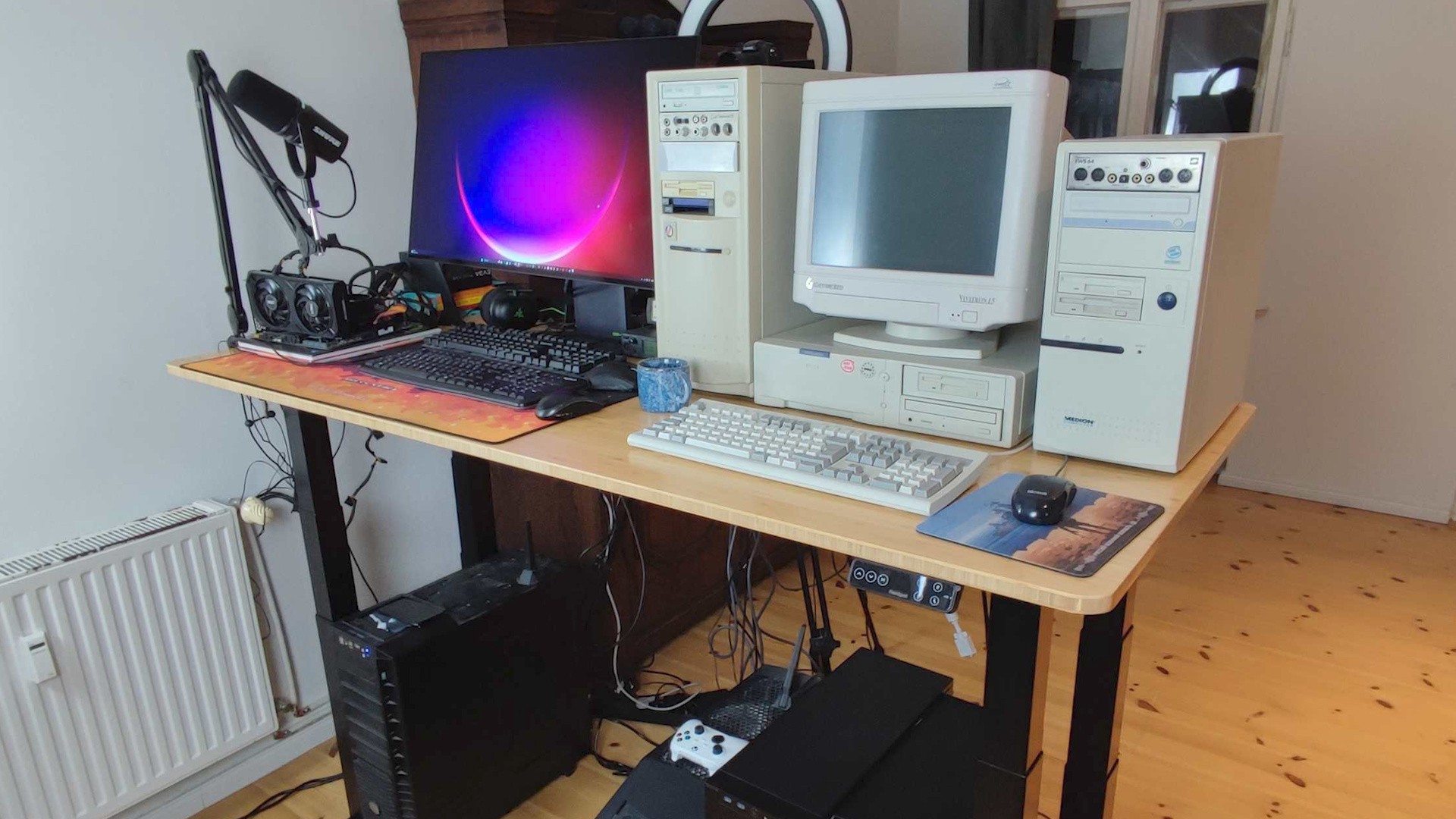
To cover a similar aesthetic and to deliver the functional usage I now need, I chose the 80x190cm Bamboo desktop surface as offered by Flexispot for the e7 series. It has roughly the same colour and wooden surface but I lost 10cm of desk depth. Thankfully, this wasn't an issue. As you can see from my original desk image, I did not even use the 10cm advantage in any way - the retro PCs and peripherals parked on top were leaving much space at the back, even more than 10cm.
The bamboo desktop surface it is being replaced with is thinner, as it no longer has a structural support bar on its edge like the previous desk did. That being the case, I can now easily leverage desktop side clamps for armature lights, microphones, cameras and VESA monitor arms (where I currently have an Ergotron LX on backorder). With the E7 I now have less dead space - and that space that I had was more multifunctional thanks to being thinner.
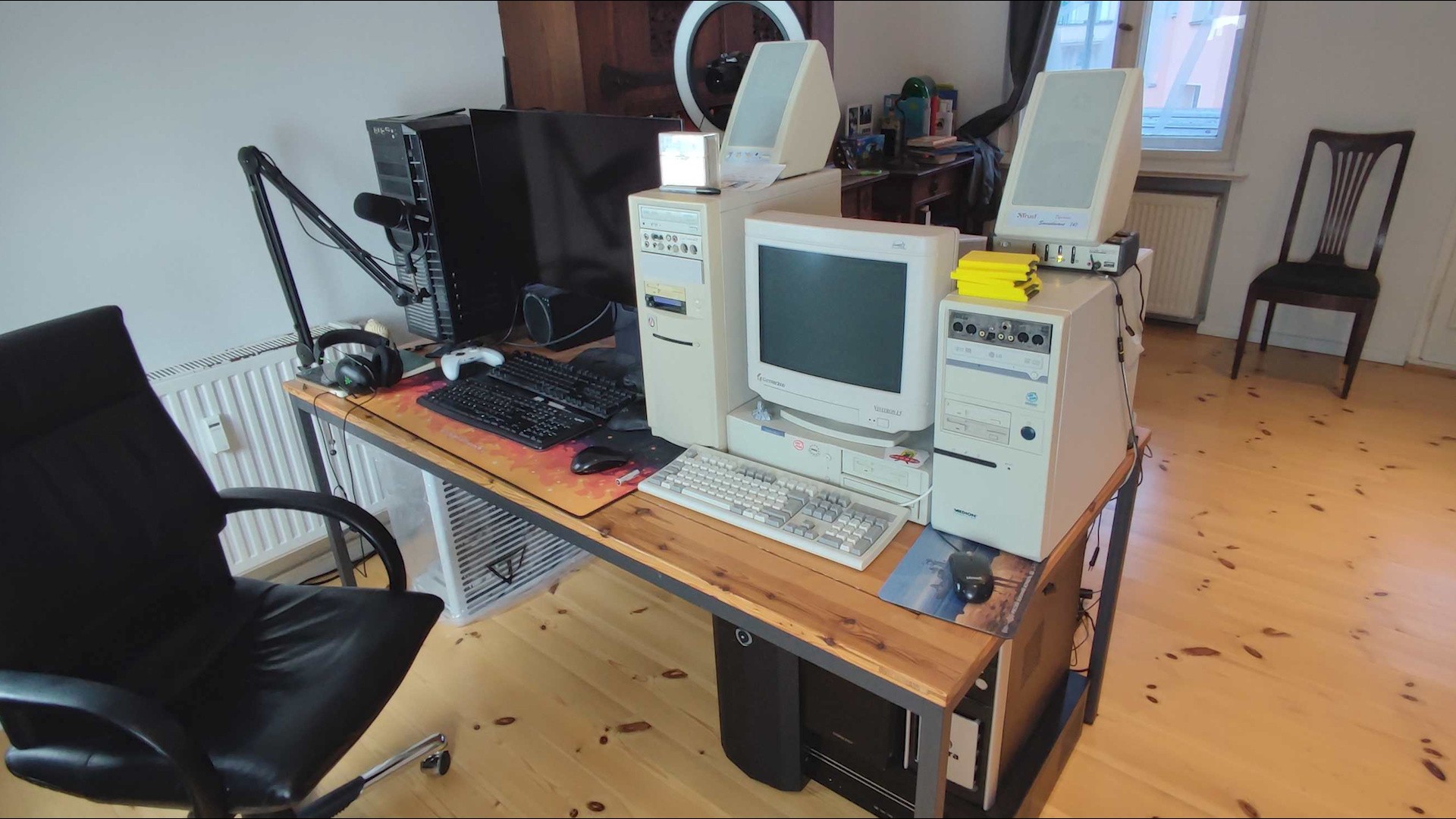
Another consideration in choosing the desk was how much weight it could bear. I had over 100kg of equipment on my previous stationary sitting desk, with much of the weight taken up in a lopsided arrangement where lightweight modern objects were on the left half and the heavy-duty retro steel cases and CRT were on the right. I was going to continue this set up style so I made a purposeful decision – I opted for the Flexispot E7 Plus instead of the E7 Pro.
The E7 Plus has four, thinner spaced-out stabilising motorised table legs instead of two thicker ones. It aesthetically resembles a classic desk and importantly its four-legged design can support 20kg more max weight on the desktop surface (200kg vs 180kg of the "pro" model).
With the E7 Plus, my desktop equipment arrangement is still under the max 200kg limit, which offers me great room for increasing weight on the desktop if need be. I am lucky enough to own a 21-inch ADI Microscan CRT which weighs 30kg and I will move it onto the desk in the future in place of the comparatively diminutive Gateway 2000 Vivitron 15 I have right now.
With the weight and dimensions checked off, the E7 Plus was ordered and delivered in less than a week's time with the legs coming separately than the desktop surface. Assembly was straightforward but definitely requires some common sense and preparation. For one, I do not recommend using traditional hand screwdrivers to assemble the desk. It is possible, but it would be arduous at certain points where you have to screw lengthy screws into the bottom of the wooden desktop surface.
If you're thinking of purchasing the E7, you ought to make sure you have an electric screwdriver that has a modular top with support for longer screw bits. If the screw bit is shorter on an electric screw driver, a number of the screws required for assembly will be hard to drill in as they are flush on stabilising metal pieces that might get in the way.
So, get an electric screwdriver and make sure that its screw/drill bits are of a good length (over 6cm if possible). Another aspect of preparation is room space. You need to factor in that the unassembled desk takes up nearly nearly twice the space on the floor, so plan accordingly.
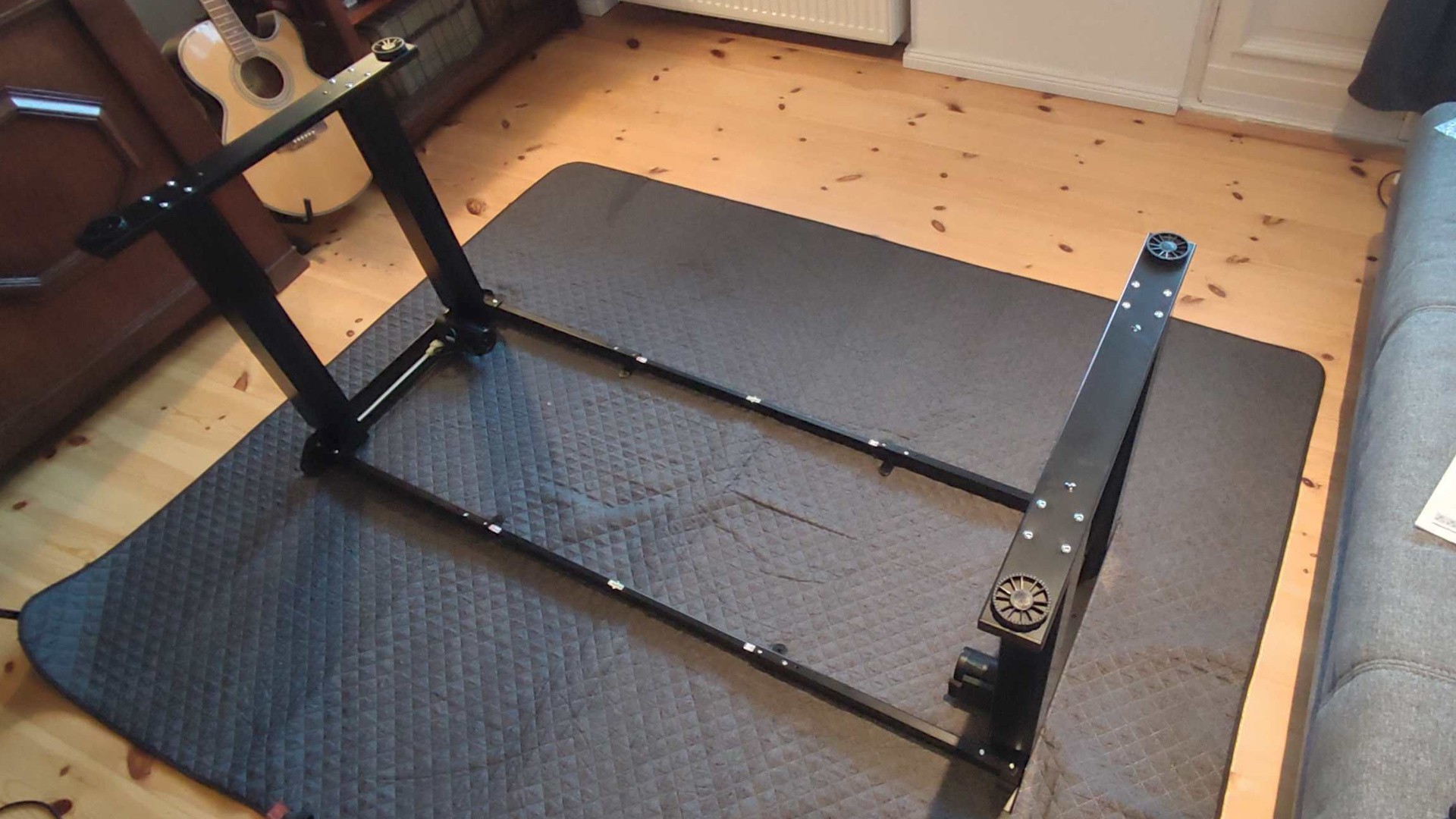
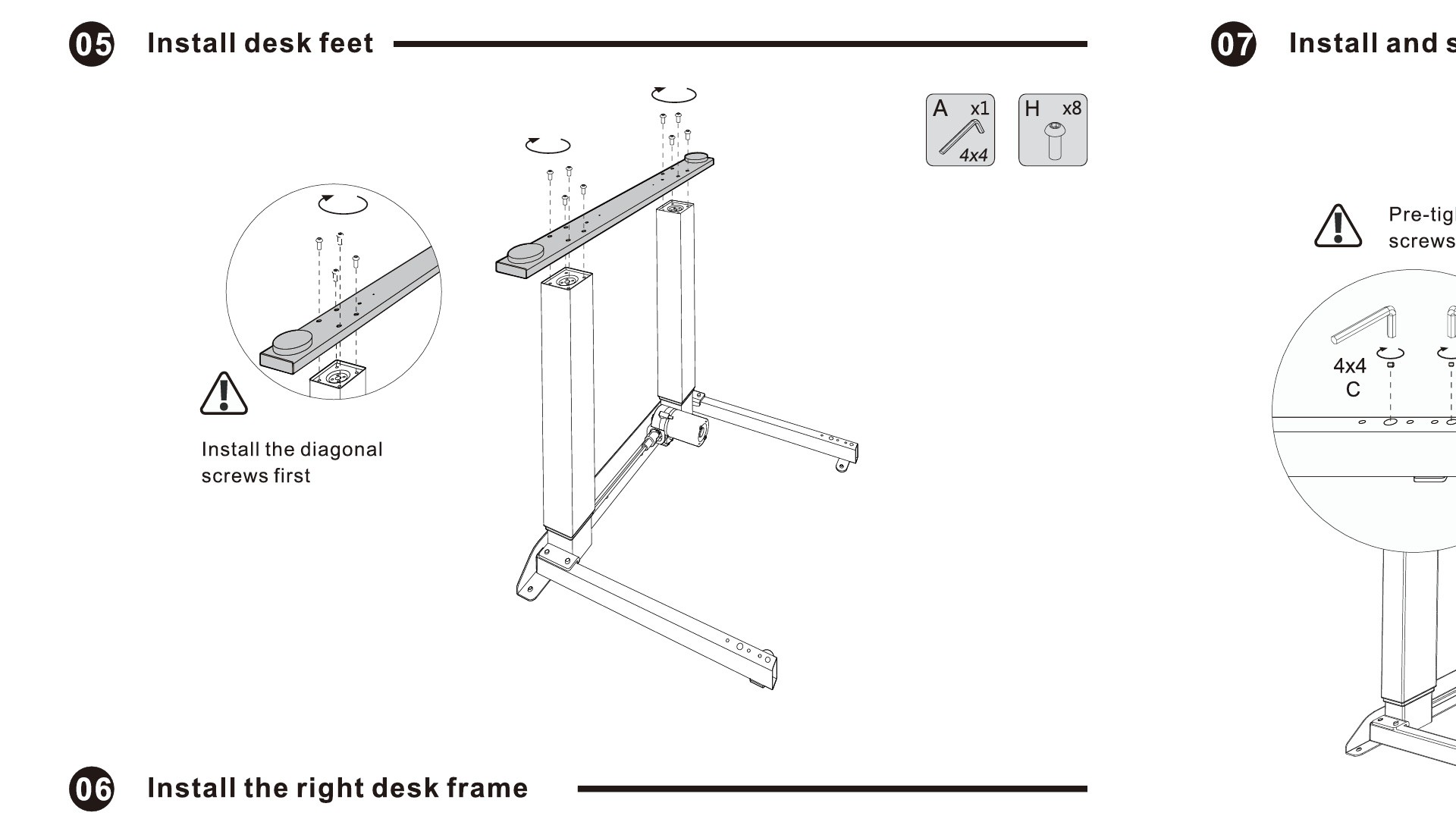
While assembling I recommend following the pictures on the instructions as much as the written text. The technical diagrams have 1:1 orientations and can clue you in easily as to how things need to look. In a two-person team we took about 3.5 hours to assemble the desk, where we spent roughly an hour of that time double-checking our work. We are not experienced builders so I think it would go much quicker if you have assembled such furniture before and are more sure in your handiwork.
In building the desk we were grateful for the good part labelling and the relatively few parts that require user assembly. The only real snag we had during assembly came around step five where you connect the table legs with the bottom bar that eventually rests on the ground. Initially, as we tried to screw this bottom bar onto the legs, the pre-fashioned screw holes it had did not line up with corresponding holes on the table legs: the reason being was that the legs were already too tightly screwed into the support beams that house the motor.
The solution was to loosen the screws from steps one, two and four a touch to make the bottom bar align with its pre-ordained screw holes. I think this simple snag could have been avoided if those steps communicated that the screws do not need to be 100 percent screwed in, rather 95 percent screwed in to allow adjustment/wiggle room for alignment in step five. Still we managed to figure it out and the desk was soon up and running and connected to an outlet.
Since assembling the desk I have had two weeks with it and have figured out a lot about how I want to use it and how to achieve best comfort. Firstly, I discovered that different standing activities require different desk heights. If I am typing scripts, editing a video in Adobe Premiere or playing a game the desk, I set the desk to 115cm; If I am recording a DF Direct segment, I set the desk to 107cm, so that the camera has an obstructed view of my face without the monitor getting in the way.
Meanwhile, if I am painting a Warhammer figure after work on the weekend, the desk is at 122cm so I can rest my hands on it while having the figure as close to my face as possible, without requiring me to slouch or crane my neck to get that macro view of my painting. Here the E7 makes adjustments easy with its control panel where I have saved the various positions in its memory bank: but even if I did not use that feature, holding the down or up button is simple and fast. As the desk is moving up and down it is not loud and the desk remains perfectly stabilised with no wobbling or vibration in spite of the heavy equipment I have on it.
Another learning I had from my first two weeks with the desk is that standing work means having a good surface to stand on that is healthy for your feet and legs. I have been wearing cushy trainers with thick gummy heels on top of a thicker foam yoga mat, but if you do not have such things lying around, you can purchase ergonomic standing mats.
I also learned that you need to shift positions while standing and working. A physical therapist would say the same, but it is unhealthy and potentially uncomfortable to be in any one position all day long, standing or sitting. So if you are using a standing desk, you should periodically shift weight between legs, mobilise your hips occasionally and take breaks to move around and stretch yourself out. This is important for me with my back injury, but it is really important for anyone working a desk-based job while sitting or standing.
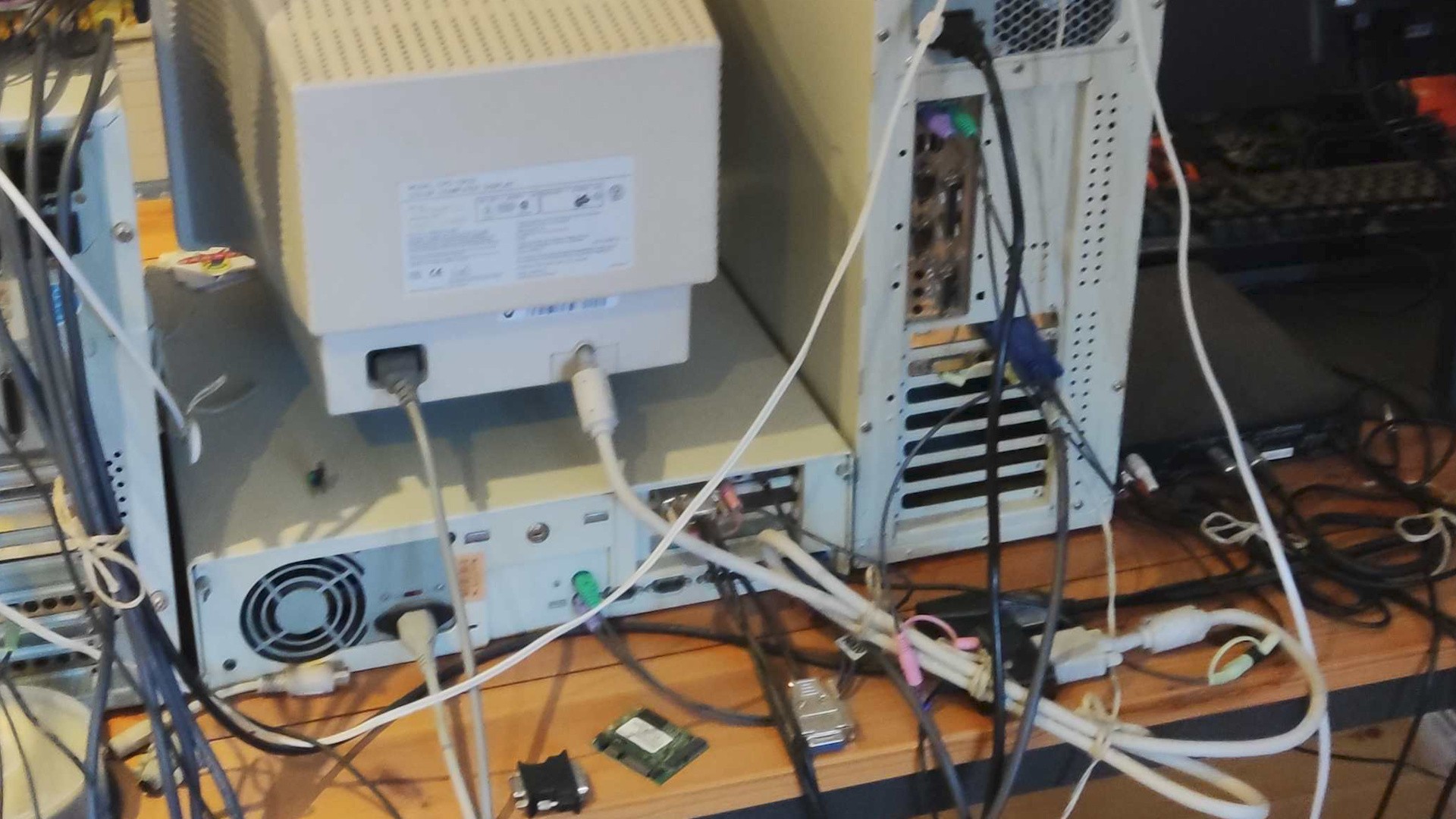
My last takeaway from using the E7 Plus for two weeks is that a work desk can be optimised over time as you get into the groove of using it. Right now, I am snaking the power cables from the back of the desk to power strips on the floor. It works, but it would be nice for the back of the desk to be tidier. To remedy that I will be grabbing some cable management rails to mount some power strips and other extraneous stationary cable devices (a KVM, for example). With one or two of those installed on the underside of the desk I would have a much cleaner and organised cable management set-up than I have ever had before.
I also am looking to add more armatures to its sides and back for lamps. At the moment I am utilising old soft-boxes on separate stands and having even more stuff on armatures would free up valuable room space. I am sure in time over the next few months I will be learning even more about using the new desk and I'll be sure to keep you updated via our various channels. How does the table hold up over time? How am I cleaning the bamboo surface? Perhaps most importantly, how is my back healing and what is it like to work while standing over time?
Please note that some external links on this page are affiliate links, which means if you click them and make a purchase we may receive a small percentage of the sale. Please read our FTC Disclosure for more information.


Comments 18
I've thought about getting an adjustable desk since i work from home and game on my pc, but man, i got a bigger corner desk with a hutch and it would require a massive redesign of my office. That's a lot of work lol. glad you found something that works well for you though!
this is a fantastic write up. i went through similar back problems and ended up changing my chair out, it has helped mitigate allot of pain, but i enjoy standing and working too.
having just gone insane and purchased a dell p1110 crt, i find your endorsement of the desk’s CRT qualifications reassuring!
Great article Alex! I am also 35, but unlike you, I got my herniated disk 11 years ago (L5/S1). I had a microdiscectamy to cut out the part of the disc that was sticking out and I don't think I could have gone on much longer without it. But, if cortisone shots and better posture solves it, that's great for you. I just recommend trying to go through all the steps in the process more quickly than not. If you need surgery, it's way better to get it sooner than it is to live like that, have the problem get bigger, and then have a surgery that isn't as effective as it could be.
I also HIGHLY recommend going to an office furniture surplus store and getting a Herman Miller Aeron chair with the lumbar support bar and the tilt limiter. When my old Aeron broke, I tried to use another chair and it was so painful that within 14 hours, I spend $1000 on a brand new chair and I still think it was one of the quickest & best purchases I have ever made. It's not cheap, but if you have back issues, you need it. Do I need to spend $1000 on a GPU? Absolutely not. Will I pay $1000 for a chair at the drop of a hat now? Absolutely yes, 100% of the time.
Good luck!
Great write up, Alex.
Hope your back is doing better these days, I know that kind of pain is a real challenge.
@AlexBattaglia Of course! My email is my username at Gmail.
Oh, I’m so happy to see someone else really into good office furniture.
I moved a couple of years ago and one of the big things I Decided to do was get a new desk and office chair. I have a Herman Miller Cosm midsize Which I absolutely love. Maybe TMI, but as someone with a slightly larger posterior, it’s very nice to be able to just fit that in there without hitting some sort of hard plastic because it’s just one solid mesh
I also bought an office desk from a company called Montana, which is ironically enough a Danish design firm. One thing I wanted to do with my desk set up was not compromise completely Aesthetics. I really love the way it looks. It’s got nice chrome legs and a blue table top. It can get slightly wobbly when it’s very high, but it also goes super high so I can just adjust throughout the day. I also have to admit the big benefit of it is that I can push it high enough that I can roll my chair under the desk for when I Want to free up some space For VR.
I’m mostly spending time doing gaming and then some light work and I don’t primarily use it in standing mode but especially when I’m playing a game like wow which I can play for hours at a time being able to adjust on the fly is super nice. A big thing for me was it being able to stow away cables in the desk because I keep my PC under my desk. I only really have my keyboard speakers and monitor connected directly to the PC. And those cables can stretch.
All in all a great office chair and great table is such a big win both for gaming and work. And I’m super happy that you’ve taken this opportunity to Spotlight this. I’m hoping your back heals well. Maybe poke and prod at the other team members so they can share their set ups because it would be great to see you all talk a bit about one of the bigger Health worries with gaming.
@Someguyperson Wrote to you below! Would love to talk to you in DM or email about your experience.
@Someguyperson Email sent!
Great article Alex, hope you're on the mend now. Your story of injuring your back in the most mundane way is very familiar: thankfully any issues I've had were muscular, so tended to fully clear up in a few weeks/months, but I've done the most damage via some kind of rigorous physical activity the day prior then being tipped over the edge by a sneeze, or tying my shoelace! Back issues suck, you take care (and also please write more website articles, you tell a good story)
I have been looking at getting a standing desk for a while now as I am getting some minor back problems. Last year I decided I had to do something about my health and fitness so I joined a gym, lost 40KG and still working at keeping fit and healthy, but this also lead me to be aware of other health niggles. Having been a desk worker for 20+ years, and a gamer for 30+ years, in my early 40s I have weak core muscles and especially lower back, as well as not great desk posture so this year is about fixing my back and core strength whilst maintaining my newfound fitness.
I have been looking at standing desks for a while and struggling to find one I actually like, four legs seems essential for stability, at work I have two 33 inch monitors, plus laptop and other bits so four legs is essential rather than the two column designs of most as with that weight on most two legs models wobble, I also want adjustable as I will still want to sit down sometimes. These look really great and the cable management add ons also look useful as I know people with sit stand desks where the cables snag and pull. Thanks for this, will properly assess and it may be my next office purchase.
I went through the same thing, but in my case it was caused by vertigo from sitting too long in front of a computer. Switching to a standing desk made a huge difference for me. I now use a FlexiSpot standing desk, and I’m very happy with it. The standing matt is an interesting tip, thanks a lot.
See you at Kieser Training Alex?
The standing mat is an interesting one as I have not thought about it much before as whilst I tend to wear trainers most of the time I am rarely standing for 8-10 hours a day, do they make any difference over having comfortable well fitting footwear?
Great write up and advice, Alex! Thank you for sharing. I also burst my L4 in my early 30s - and would echo the previous comment on lumbar support. PT was my solution to stop the pain within the first year, but longterm behavioral + posture changes are important, too. Nowadays I'm very cognisant of how/where my elbows meet arm rests, how long I put any weight/forward leaning onto a desk, and make sure I move my leg positions (I have a tendency to curl my legs and feet under the chair like some sort of coiled snake 😅).
Wish you all the best on your path to recovery!
Not too long ago I bought myself the Uplift V2 adjustable standing desk and I have to say I’m pretty happy with it. I work from home as well and I wanted something that would allow me to be proactive in preventing back issues and the like.
I wanted the standing option but even aside from that just being able to really dial in the exact height without having to disassemble the desk was important to me, not that I ever change the height while I’m sitting apart from switching to standing, however the right height was important to me and this gives me the flexibility to try different heights with ease.
One thing I was concerned about was wobble and so I looked at a lot of options available to me in person (I’m a fellow Canadian so shout out to Oliver) and they were all very unstable at height. I’m happy to say that the uplift I ordered is more stable than the PS4 after all those years of stability updates 😜. Even with just two legs I haven’t had any issues and I can type or write on it without much movement if any at all. I forget the exact measurements but it’s similar in size to what Alex purchased.
I’ll admit the desk I bought was spendy but I felt it was a good investment in my own health and was happy spending that money. It was delivered promptly and it was a breeze to set up, even by myself, though it’s recommended to have a helper and while you can manage like I did I would agree that it’d be easier with a helper.
Alex I hope your back improves and the worst of the pain is behind you (no pun intended). I’m interested to hear how you manage with the standing desk and also if you make any changes to the chair you’re using. That’ll be my next purchase to improve my work setup.
@AlexBattaglia , I had herniated disc surgery for my lower neck, C5/C6. I wouldn't have been able to lead a normal life without it. Unsure what the surgical options are for the lumbar area, I think its more complicated. Good luck. One thing if I may, for when you are not in the standing position, that chair in one of your pictures... its not appropriate for your condition. You need something much more ergonomic. I use a Herman Miller Embody. They are expensive but its peanuts compared to the value of your health. Wishing you the best. I know the pain, and its horrible.
Hi Alex! I'm sure you're flooded with advice atm, but I basically have the same injury as you ("protruded/bulged" disc but not fully herniated although it is both my L4 and L5). It is a serious injury, but glad to hear you are not opting for surgery as your disc still can be rehabbed.
As it stands, I don't fret too much about having to live a life avoiding triggers, but I do get flareups, but now they last at most 2 days rather than putting me out for a week plus. I find that avoiding trigger positions all together is not good in the long run. You'll learn what your limits are, but controlled risk>>>no risk. Find safe ways to stretch and decompress, but don't overdo it. At the end of the day, only strength training will give long term improvement: not stretching.
My biggest recommendation is to invest in a reverse hyper extension machine. I don't know what PT is like in Germany, and I'm sure it is better than in the states, but my PT focused almost exclusively on core strength which only helped manage symptoms. Technically, your posterior chain/erectors are more directly important for your back support. The reverse hyper machine lets you train these areas with no risk. If you drop the weight, you get traction, not shearing, so it is basically a win-win. Your spine is neutral through the whole movement, so it only uses your static strength to train erectors, which I can safely get them very pumped with this machine. I will even use this machine mid flare up as simply getting bloodflow into the area gives me relief the next day. Also, my PT often had me on a bike to warmup, but the BEST cardio to give me back relief is walking backwards on an inclined treadmill.
And I see you already got a great rec for an office chair, but if you are looking for something that is a fraction of the price if you just want something to sit on so you don't have to stand to eat meals, then I highly recommend the "Ergo Ergo" stool. It's a less extreme version of sitting on a yoga ball, but it is a similar premise: you have to use your legs and core to stay upright or else you topple over. So it's the next closest thing to standing.
Alex,
To see you getting emotional on your video explaining your issue regards your back challenge was so moving. I’m a little older (56!) and have led a life of sitting at a desk for both my job and my gaming pleasures! 3 years ago it came back to bite me…(even though i was very active regards exercise). First my l5/s1 was found to be effectively a thin slither and now I’m also battling a c6/7 diffuse disc in my neck. Various symptoms, injections, close to surgery (but backed away on that as it was a fusion in my case) and I’m still working through exercise, yoga and lighter routines to try and lead a more normal life again….as others have said it’s about moderation, not overdoing it…its a rollercoaster - good days and bad days, and the emotional toll can be draining, but the battle continues! Good luck on your recovery! P
I had a slightly similar experience about 3 years ago at age 35. I'd been neglecting going to the gym due to all the Covid closures and having a toddler in the house, and then, one morning, I felt a new kind of pain in my lower back, right next to my spine — I couldn't sit on the floor or stand straight, and finding a comfortable position while lying down was almost impossible.
I was too busy/stubborn to visit a doctor or PT, but I found some relief in doing a lot of planking and deep stretches, as well as working almost exclusively at a standing desk. Ultimately, the real fix was going to the gym, committing to a compound lifting programme (such as 5X5), and adding way more lean protein to my diet to promote muscle growth.
It took a lot of time and a few setbacks, including going overboard and injuring the same back muscles due to improper deadlifting technique, but I can now say that I've managed to bounce back and feel better than ever. And although I'm more time-crunched than ever with work, university studies and raising two energetic kids, I've been able to keep my back healthy even when I have less time to go to the gym — honestly, once you've gotten your core muscles in order, it's mostly about lifting when you have time, walking enough every day, consuming enough protein with every meal, and getting enough sleep.
Best of luck in your recovery!
Show Comments
Leave A Comment
Hold on there, you need to login to post a comment...