
 by
by 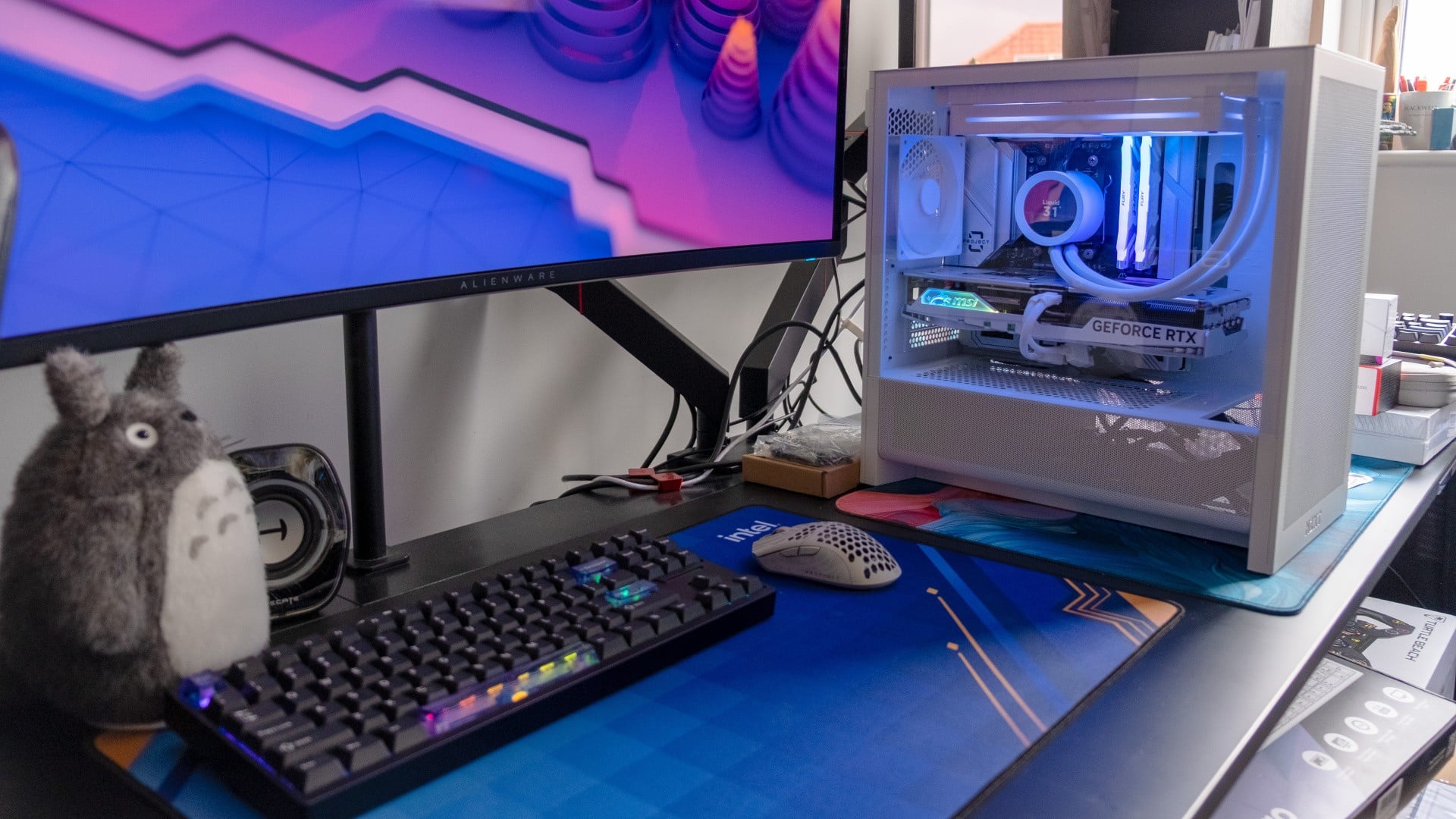
Have you heard about back-to-front motherboards? They move all of the fiddly cable connectors to the rear side of the board, eliminating the hardest part of PC building and giving you a clean look besides. The concept took off a few years ago, and it's now possible to find relatively affordable motherboards from MSI ("Project Zero"), Asus ("BTF") and Gigabyte ("Stealth"). I was aware of the concept, but it wasn't until I built in one recently that I realised what a game-changer it is - especially for first-time PC builders.
I got the idea to try this when I received the H3 Flow Micro ATX case from NZXT; it's one of an increasing number of cases that comes with the necessary cutouts. I picked up a used MSI Project Zero B850M motherboard on Ebay for £160 (one of my favourite ways to build PCs on a budget), then plugged in a selection of parts from the white gaming PC I built for Eurogamer in 2025 with an NZXT Kraken 240 Plus AiO.
It's common to hear that building a computer is just like adult Lego, and with a back-to-front motherboard, that actually feels kind of true. After you've installed the CPU into the motherboard, which remains a bit nervy, there's no real potential to mess anything up - it's just a case of popping in your RAM and SSD, mounting the motherboard, then adding the cooler, GPU and power supply. If you can use a screwdriver and push a thing into another thing, you're pretty much there.
For me, a normal part of the build process is running cables as you go, and inevitably finding that what you've done isn't quite right - so things need to be disconnected, reconfigured and plugged back in again. Here, thanks to all of the motherboard cable connectors being accessible on the rear side, you can leave the plugging in cables bit until the very last step. If you have any components in the front part of the case that have their own cables, like case fans, AiOs or graphics cards, then you just poke the wires through to the back side via the nearest available aperture - simple.
And that final connecting step for me was genuinely joyful. There are so many times where I've sweat and swore while willing my fingers to become smaller and more graceful so that I can finally plug in the obnoxiously-placed connector that has me flummoxed. One of my clearest memories from circa 2005 is having my hands jammed into a tiny HP office PC I was converting to play games, struggling to plug in the tiny individual front-panel connectors over 30 hellish minutes, my hand emerging bruised and bloodied. Here it was the exact opposite experience - quick, easy, never in doubt.
Would you pay a (small) premium for a back-to-front motherboard? (241 votes)
- Yes, I already have
- Yes, I'd definitely want this for my next build
- Maybe, I'd consider this for my next build
- No, I'm not too interested
Running even bulky motherboard power cables is dead easy, as you're going from the back side of the board to power supply tray on the same side, while fan headers are all easily visible and even the dainty front-panel connectors can be one-shot. This was the first time I've ever not had to refer to a motherboard manual to see where an internal connector was, because you can actually see the labels for the darn things without having to carefully angle torchlight around a CPU cooler or a graphics card, like you're Lara Croft trying to solve a light puzzle in a Mayan tomb.
All told, it took literally five minutes (according to photo timestamps) to plug in every cable needed, route them cleanly and cable tie them into position - what a revelation. The entire build took only an hour too, and that's with frequent breaks to document the process and sip coffee. That made for by far the easiest and most relaxed PC build I've ever done, and the final result looks super clean too.
After having experienced it for myself, I'm now convinced that these back-connect motherboards ought to be the standard going forward. There are only a handful of options from MSI, Asus and Gigabyte on the market right now, but I would expect many more for the next generation of AMD and Intel processors, especially for mid-range and higher boards that are looking to one-up their rivals in terms of features.
What do you think of this emerging technology? Have you built with one of these boards before, and would you consider it in the future? Let me know in the poll above or the comments below.


Comments 4
To me, it's a bit too limiting at this time. You're locked into a more limited selection of motherboards & cases. I'm a huge fan of Silverstone and all their weird & wonderful cases, but most of them don't support this standard. I've noticed that mATX boards are a lot less common than they used to be, so you're kind of locked into a particular build.
If you're new to all this, that might actually be helpful. But, as a very experienced PC builder, these constraints don't appeal to me that much. You'll have to take my Alta G1M out of my cold, dead hands or come up with something much nicer or crazier for me to move to something else.
I just built a 250k system. I considered it but in the end with a black case, black cables and a bit of extra time on the managements my cables are barely noticable on the normal system. Didn't seem worth the current £30 or so premium, and I was worried about the back connectors not allowing the back of the case to shut (also an H3 flow). I was worried that all my parts would arrive then I'd get compatibility issues in some way... Maybe when they're a bit more common and like for like on price...
BTF seems like it is ok for certain builds, especially anything small, but for me a big case cable management and hiding them is pretty easy and offers much greater flexibility. It is not for me at the moment, but I can see it's utility for SFF PCs.
To me it's definitely an improvement, I dislike plugging the case related cable especially. Now I tend to keep my cases and motherboards like forever so I have no idea when I will consider that.
Show Comments
Leave A Comment
Hold on there, you need to login to post a comment...