
 by
by 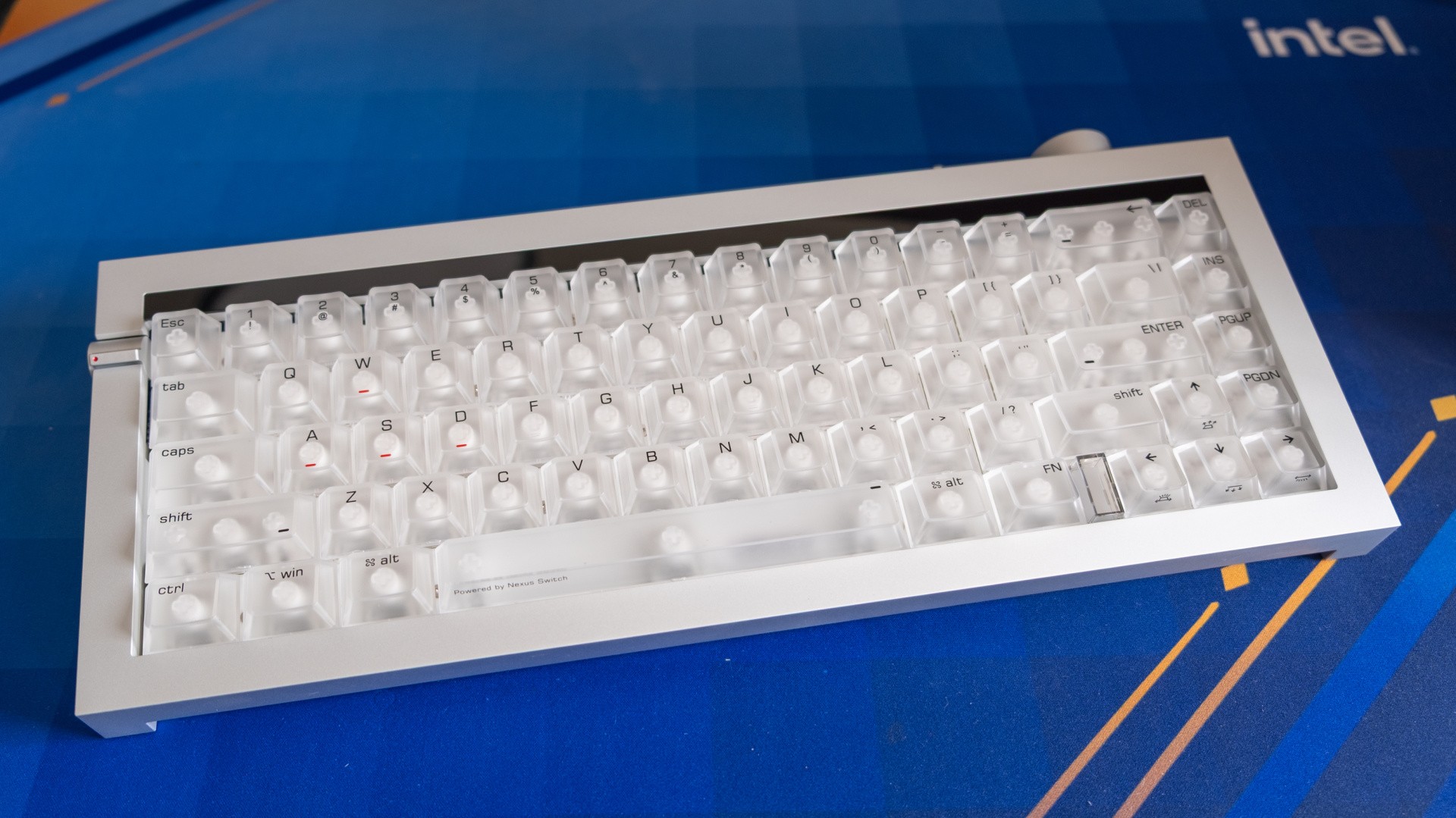
Lofree make some of the most stylish mechanical keyboards around, and their new Hyzen model is no exception. It's made from a single block of milled aluminium, with large, purposeful controls with tactile feedback that remind me of a Braun stereo from the 80s. The Hyzen weighs nearly two kilograms, and is expensive as you might expect - £139 for the wired model and £153 for the tri-mode (wireless, Bluetooth and wired) alternative. These are the Kickstarter prices; expect retail to be around 20 percent higher.
Beyond its good looks, the Hyzen also comes with a full complement of hybrid mechanical-magnetic switches and sockets. That allows the board to accept a wide range of mechanical or magnetic (TMR) switches, but the ones pre-installed combine a traditional mechanical action with off-axis magnetic sensing, allowing you to switch between either method. I'm not sure that's a useful feature - key presses feel the same either way, so you may as well have the adjustable actuation point and extra features of the magnetic sensor - but it's certainly interesting, and I appreciate the flexibility.
The same general "I respect it, but I don't quite understand it" vibe extends to a lot of the keyboard's other functions. As this is a 65 percent keyboard with no F-key row, you need to hold the Function key and press the numerals along the top row to access those keys. On regular 65 percent keyboards, you just remember this simple mapping - but on the Hyzen, you hold down the Function key and a tiny display above the top row illuminates to show where each F-key resides - 1 for F1, 2 for F2 and so on. (If you rebind these keys, the new bindings aren't reflected here either.)
Flip a switch next to the Escape key, and the top row instead becomes a permanent F-key row, but if you hold the Function key now, then you instead get Windows or Mac shortcuts for media controls, keyboard backlighting and so on. That's nice, but I wish I could access those shortcuts without having to flip a switch first - as I need to flip it back immediately afterwards if I want to change weapons in an FPS or type a hyphen into a Word document.
Similarly, take the lovely three-way switch on the back side of the keyboard. This flips between "CAB", off and "WIS". I'm not sure why they chose these weird labels when "USB" could have been the middle / off position, with "2.4GHz" or "WiFi" on the left and "BT" on the right. As it stands, the keyboard is constantly in "CAB", and says so just above the backspace button. I wish I could turn this off for a cleaner look, as the information isn't helpful.
When it comes to typing, the Hyzen feels as expensive as it is. The switches are super smooth because they're pre-lubricated and gasket-mounted, so key presses feel very easy without being light enough to happen accidentally. There's no audible click or tactile bump, but bottoming out the switch produces the sort of deep, decisive tone favoured by many in the mechanical keyboard community thanks to the inclusion of several layers of sound-dampening foam. The keycaps here deserve special mention too, as they're made of transparent polycarbonate with crisp, slim legends in a nicely chosen font. These don't feel as slick as I was expecting, with a bit of texture evident to keep your fingers locked in. For a magnetic switch keyboard, the typing experience here surpassed my expectations.
The gaming side of things feels underbaked by comparison. The usual tranche of magnetic keyboard gaming features all seem to be here, but most are hidden within the vaguely named "Advance Key" section of the software. The actual feature names here are badly chosen too, with only "DKS" and "SOCD" potentially being recognisable to anyone familiar with magnetic switch keyboards - and they're poorly explained, with a too-brief blurb that doesn't really explain where or why you'd want to engage them.
One description, labelled "Key Progressi...", states "Select two keys on the keyboard to set as key travel priority function. Using this function may be judged as cheating, please use with caution." If you haven't used a magnetic switch keyboard before - or even if you have! - would you understand this? For my money, I think these explanations need a proper rewrite.
Outside of the Advance Key tab, the options are thankfully a little more ordinary. The "Mode Setting" section lets you enable a "lightspeed" mode, echoing the tachyon mode for Wooting keyboards that shuts down unnecessary processing for gaming scenarios, while also giving you the option of disabling the Windows key, Alt + F4 and Alt-Tab. (I never accidentally hit the Windows key, so I hate it when gaming mode disables this automatically - let me opt in!
The Actuations screen is also worth visiting, with a nifty animated diagram of a switch being pressed in real time - at least after all of the constituent images load in - and setting the actuation point, tweaking the dead zone and toggling rapid trigger are all straightforward. I found that I needed to enable the dead zone about 0.2mm from the bottom when in magnetic mode for the best results.
Once set up, gaming performance is perfectly acceptable, though I still prefer a slightly larger 75 percent layout for those all-important F-row keys in more complex games like BattleTech. Still, for FPS this an ideal layout, and once you get past the impenetrable feature descriptions you're not left wanting. I'd still give the nod to Wooting in terms of performance, but the Hyzen feels as snappy and assured as you'd want.
It's worth repeating that the Hyzen is a Kickstarter product, so there is time for the software to be improved and some of my annoyances to be fixed. The only oddity I experienced is a bit of lag when using the keyboard in 2.4GHz mode with the Lofree Hub open, which went away when I closed the tab and/or swapped to wired mode. That feels like a solvable problem.
The phrase that keeps coming to mind here is flawed masterpiece. There's plenty here that I adore, from the design to the typing feel, and for the Kickstarter price of £139, the Hyzen isn't completely unjustifiable as a unique option in the market. At the same time, the presentation of the gaming features has been fumbled, which detracts from the unique mech/magnetic arrangement that Lofree has developed. The Hyzen has already improved from its early showings, with design tweaks and bug fixes, so I hope that progress continues. As always, I'd encourage you to read a plurality of reviews to get a better idea of this complex keyboard.